
1.245
Release date: September 09, 2025
| New feature | Component check results are now displayed in the new component grid.
[
#22
] Note: This feature relates to the new component grid, which is still being developed and which is deactivated by default. Currently, the new grid is only used if it is specifically activated with the command |
| New feature | Links can now be opened in the Model client.
[
#188
] This feature builds upon the Copy Link context menu option, which allows users to create links to various objects, such as pool versions, components, component groups, parameter tables and run configurations. In the past, it was only possible to create such links. Now users can also open such links in the client, assuming that the referenced objects are available locally. The links can be opened by clicking on the red icon and selecting the option Open link. Example use-case: “User A” creates a link to the biw component and shares this link with “User B”, who opens the link in the client. The link opens in a new Model tab. 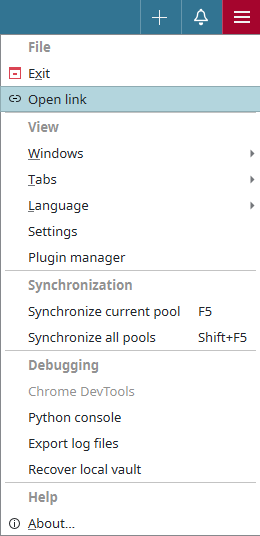 |
| New feature | Users can now configure run output settings.
[
#65
] This feature relates to the “Run Outputs” section, which is visible in the “Properties” view for run configurations. Here users can now configure settings for the run output. Specifically, they can define:
|
| Bug fix | The merge function no longer fails if the application is unable to find the nearest common ancestor.
[
#11413
] This fix relates to the Compare & Merge function. Specifically, it relates to situations when two pool versions are being compared and the application is not able to find the nearest common ancestor because it was not yet downloaded in the history path. The following changes were made to fix the issue:
|
| Bug fix | The update of metadata with a post-edit script no longer fails when an error occurs during the cleanup of support files. The metadata is now still updated even if an error occurs during cleanup. [ #11420 ] |