1.250
Release date: November 18, 2025
| New feature | The App script API was extended for updating history comments on group and pool version level. This can be used together with an AI/LLM Model for aggregating the history comments for a group or pool version from all the underlying groups and components. [ #59 ] |
| New feature | The App script API was extended such that post-edit scripts, also using an AI/LLM model, can automatically check the history comments written by users and add a check icon on the comment. In this manner, each customer can define and impose in-house rules or suggestions for the information that a history comment must or should contain.
[
#52
] For example:
When users enter a history comment, the AI checks if the history comment meets all of the requirements. If the comment does not meet the requirements, then the user sees a warning that explains which information is missing. |
| Improvement | SCALE.search: The dashboard now uses custom SCALE.sdm branding.
[
#40
] All OpenSearch-specific names and icons were replaced with SCALE.sdm names and icons. For example:
|
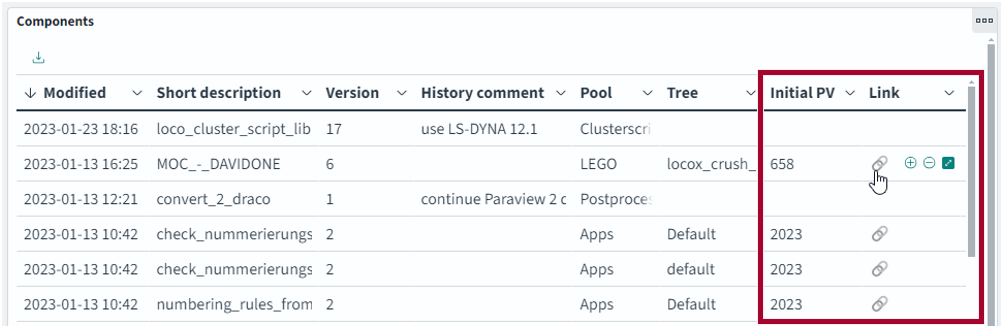
| Improvement | SCALE.search: The search index now includes a link to the initial pool version of a component.
[
#11462
] Clicking on this link causes a new Model tab to open. The pool version is selected in this tab. Note: The pool version link can only open a new Model tab automatically, if the client was configured for such links in the operating system. Alternatively, the link can be copied and then pasted into a Model client that is already running.
|
| Improvement | The AuxiliaryContentLoader now provides the job feedback node on which an app script is started.
[
#11450
] For example:
The AuxiliaryContentLoader now provides this information. Usage: |
| Bug fix | It is again possible to modify history comments while multiple objects are selected.
[
#11430
] In the past, it was not possible to add or change the history comment for multiple objects at once. Instead, the text “Symbol()” was displayed in the Changes window and the history comment could not be changed. This has been fixed. |