1.260
Release date: April 21, 2026
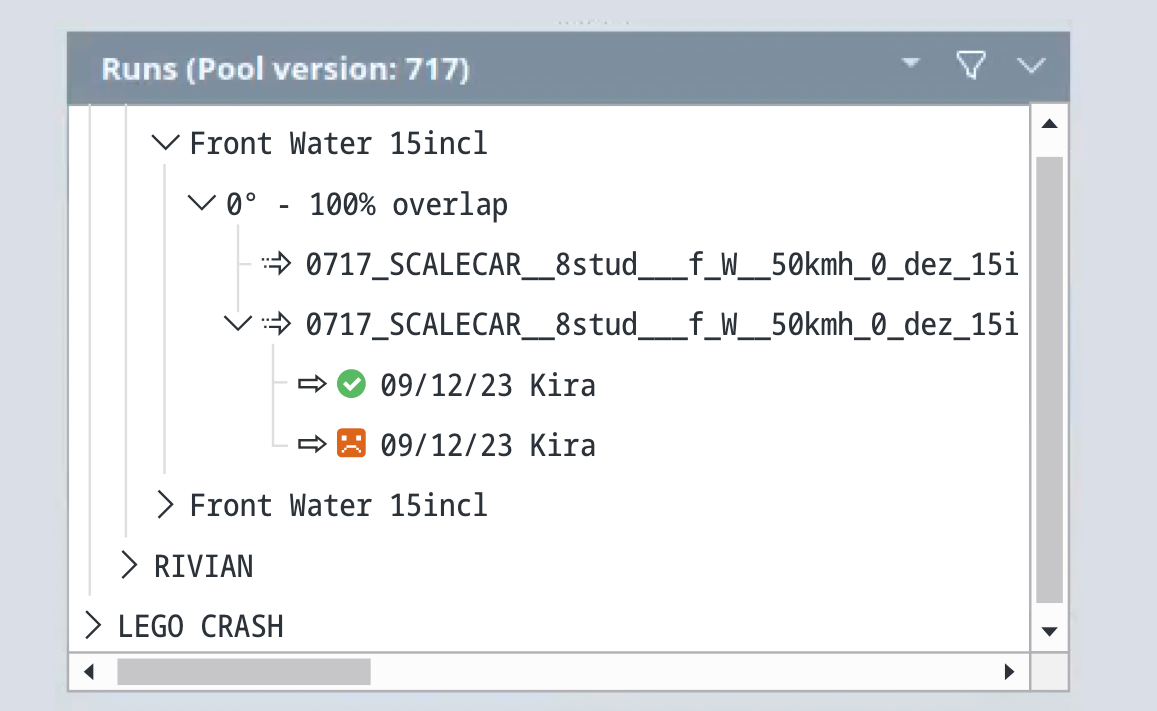
| New feature | The check results of assembled runs are now displayed in the runs view.
[
#1304
] Previously, check results were only displayed in the Properties view. Now users can see the state icons directly in the Runs view. If users hover their cursor over the state icon, they will see a tooltip that displays the meaning of the state icon. Refer to the glossary for a complete list of state icons and their meanings. Note: This feature is deactivated by default. It must be enabled by starting the client with the command
|
| New feature | The sort column is now displayed in the new component grid.
[
#10
] Note: This feature relates to the new component grid, which is still being developed and which is deactivated by default. Currently, the new grid is only used if it is specifically enabled by starting the client with the command
|
| Improvement | Time-based epoch counter for more reliable epoch determination.
[
#11587
] Epochs are used to determine how many pool entries must be transferred during sync. An epoch is a pool-dependent number assigned to each pool entry at initial creation and on each update. That means, only entries with an epoch greater than or equal to the highest epoch on the other side are transferred. Since errors in epoch values can prevent users from syncing a pool, a time-based approach to determining epochs was introduced to make this mechanism more robust. |
| Bug fix | "Copy&Paste" tab no longer blocks the "Apply" button due to supposedly empty history comments.
[
#11606
] This fix relates to the process of copying and pasting objects. In the past, the “Apply” button was sometimes disabled in the “Paste” tab, and an error was shown about empty history comments even when no history comments were actually empty. This behavior has been fixed. |
| Bug fix | History comments are no longer deleted from the "Edit with" tab if they are entered before actually editing the component and closing the external editor.
[
#11605
] Previously, if a user opened a component and immediately entered a history comment into the Edit with tab, then this comment was deleted as soon as the user edited the component and closed the external editor. This has been fixed. History comments now remain in the Edit with tab, even if they are entered before actually editing the component. |
| Bug fix | Large attachments no longer cause the "Properties" view to freeze.
[
#11608
] Previously, if a post-edit script created a very large “model check result” attachment while executing component checks, the Properties view froze until the client was restarted. This behavior has been fixed. Check results are now truncated after a maximum of 10 MB to prevent the Properties view from freezing. |
| Bug fix | Modified run configurations are now displayed in the "Set public" view.
[
#140
] This fix relates to the Set public view, which can be accessed by right-clicking on a pool version and selecting the corresponding option from the context menu. In the past, modified run configurations were not shown in this view. This has been fixed. They are now correctly displayed in a separate run descriptions group. |
| Bug fix | Preset names can now be up to 128 characters long.
[
#11637
] This fix relates to widget presets, which the client automatically names using “pool name” + “discipline name”. Previously, errors could occur because preset names were limited to 32 characters while pool names could be up to 128 characters long. The column length has been increased to 128 characters, allowing longer preset names and preventing these errors. |