1.266
Release date: July 14, 2026
| New feature | An "AI Assistant" view has been added.
[
#11688
] As a first step toward integrating AI services into the Model client, an additional component called AI Assistant was added to the dock widget. This feature is currently a placeholder. In the future, the AI assistant will bring a conversational, agent-based interface directly into the desktop client, enabling users to analyze job issues, troubleshoot client problems and get contextual help. |
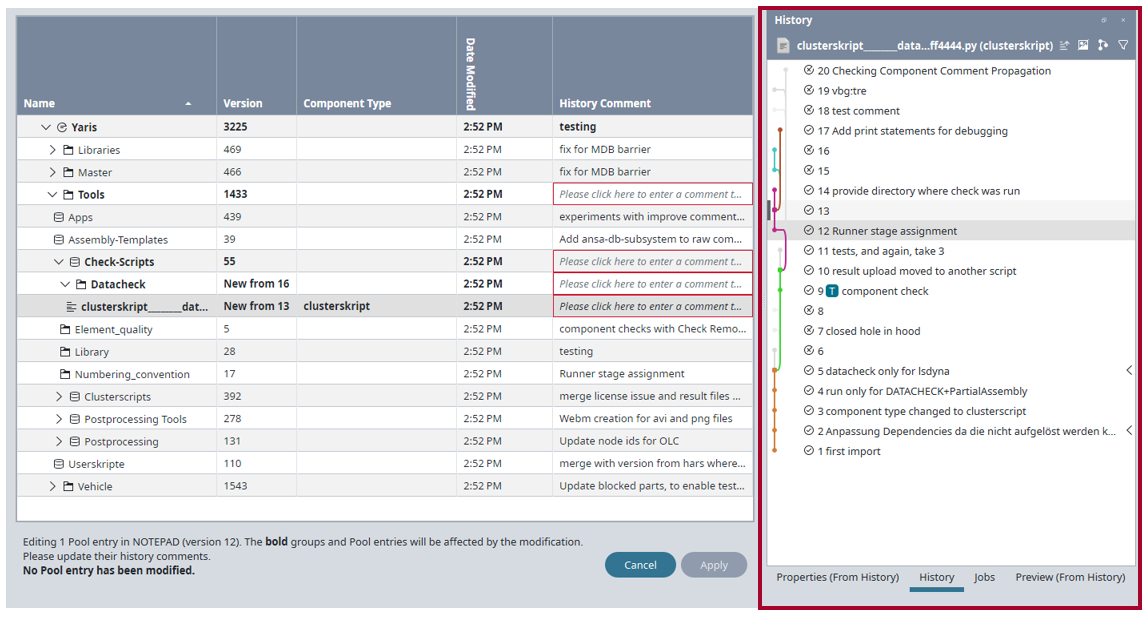
| New feature | The "Edit with" tab now shows the history view for the selected object.
[
#11436
] When editing a component in the Edit with [application name] tab, users can now open the History view to see the history of the currently selected object. Note: The context menu is disabled in the History view to prevent unintended modifications.
|
| Improvement | The "initial pool version" feature has been removed.
[
#130
] In version 1.239, the “initial pool version” feature was deactivated by default, since it was slowing down the client and it was an outdated feature, which users no longer worked with. Since then, we have observed the effects and collected user feedback. The feature has now been removed entirely. This means:
|
| Bug fix | Component types are now visible in the grid, regardless of discipline assignment.
[
#11740
] Previously, component types were not shown in the grid if the selected discipline was not configured for that component type. This was true even when existing files were present and should have been visible. For example, if a user selected the discipline “Head Impact”, then the “Impactors” component type was not displayed in the grid, even though “Impactor” data existed and was visible in other views or presets. This behavior has been fixed. Component types with existing entries are now always shown in the grid, even if the component type is not configured for the selected discipline. |
| Bug fix | Empty groups are now cleaned up when moving objects via drag & drop in the "Paste" tab.
[
#11433
] This fix relates to the process of copying and pasting objects. Previously, when moving an object to a different group via drag & drop, the icon was not removed from the original group after the move. This has been fixed. Empty groups are now cleaned up once drag & drop is complete. |
| Bug fix | Finished remote jobs no longer reappear in the job list after being removed in bulk.
[
#400
] Previously, if users removed several finished jobs at once, often a few would reappear in the job list. This behavior has been fixed. |
| Bug fix | References to deleted objects are no longer retained after closing a tab.
[
#825
] Previously, after closing a Model tab, references to some of the GUI objects from the closed tab were still kept, which caused errors to appear in the log. This behavior has been fixed. Now when a Model tab is closed, no references to deleted objects are retained. |
| Bug fix | The "Properties" view now updates correctly when right-clicking on a component that was not explicitly selected in the grid.
[
#432
] Previously, if a user right-clicked on a component in the grid without first explicitly selecting it, then the Properties view failed to update. Instead, it continued displaying the properties of the previously selected item (such as a group). This has been fixed. |