
2.0.0
Release date: March 11, 2026
End of Life: March 11, 2028
Summary of major changes
Project documents
There are new features for managing project documents:
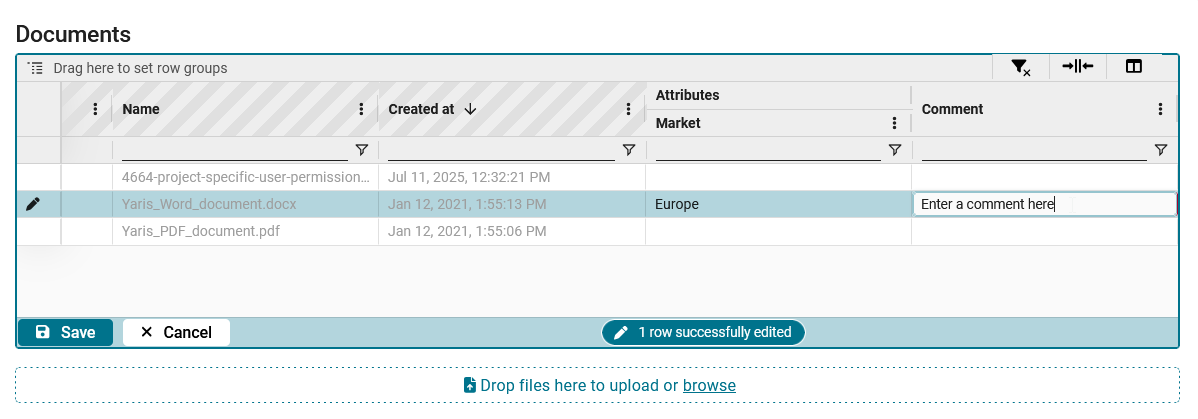
- Users can now assign attributes to documents. For example, they can specify which documents are relevant for the European market and which for the North American market. Furthermore, users can group, filter and sort documents by their attributes. This helps users find the relevant documents more quickly.
- Users can now add comments to documents. For example, they can mark outdated files with the comment “obsolete” or specify which dates regulation documents are valid from/to.
Test attributes
Test attributes have been made more flexible:
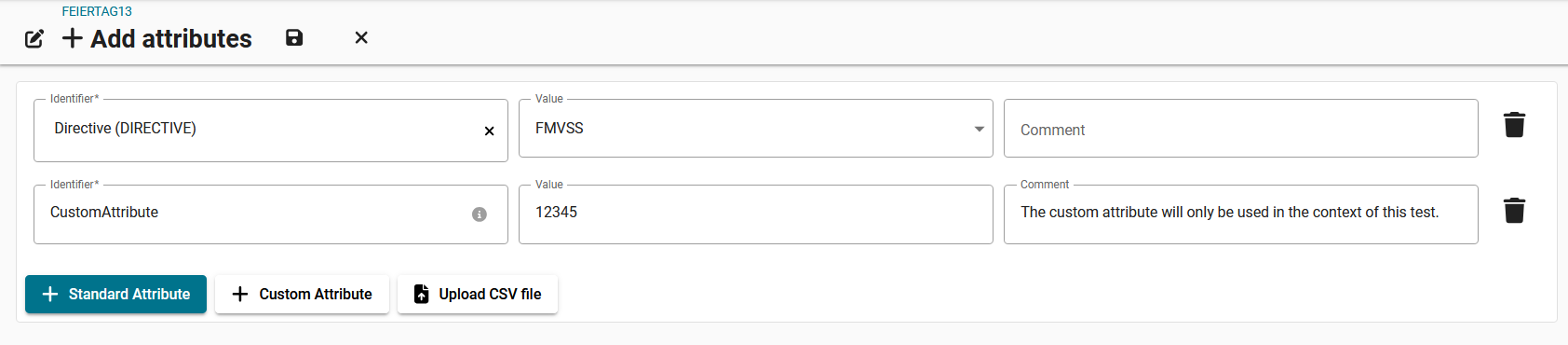
- Users can now choose between adding standard attributes and custom attributes.
- Standard attributes correspond to the MDM attributes that are already in your system.
- Custom attributes do not correspond to the MDM attributes in your system. Custom attributes are only used in the context of the specific test/simulation. When adding a custom attribute, the identifier is a free-text field. That means, you can enter any arbitrary attribute identifier.
- Users can now enter a comment for each attribute. The comment function is available when manually adding attributes or uploading attributes with a CSV file.
Project list
There are new features for managing projects in the overview:
- Product variants and project attributes can now be displayed in the overview.
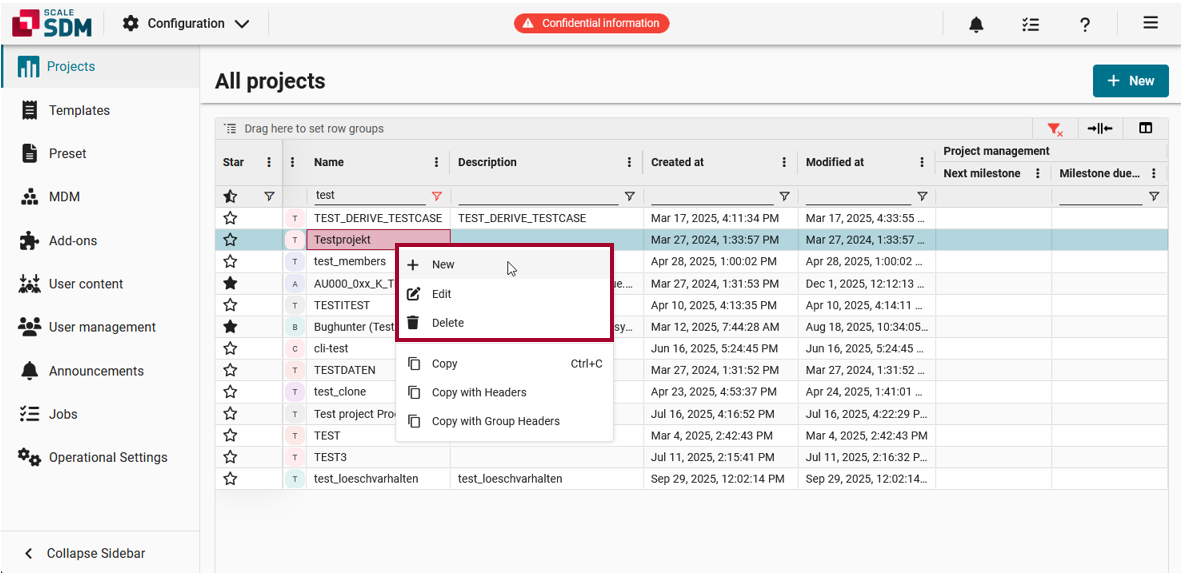
- Projects can be created, edited and deleted using context menu options.
List of all changes
| New feature PROJECT | A comment field was added to the project test cases page.
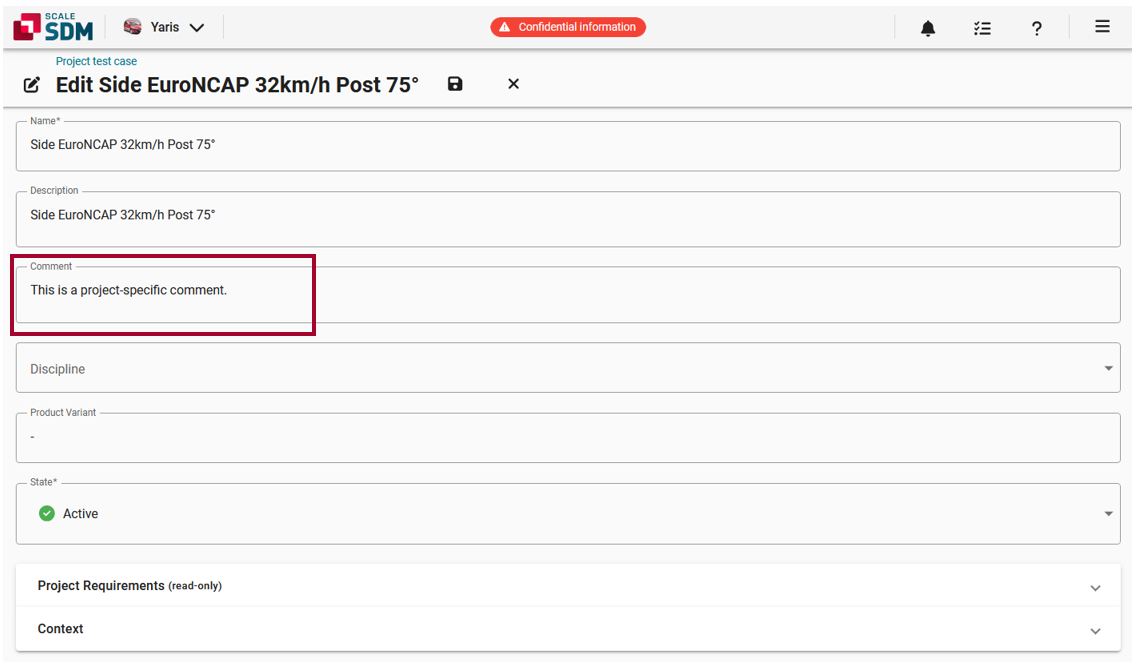
[#8014] This feature relates to the page for editing a project test case. This page now includes a Comment field.
| ||||||||||||||
| New feature PROJECT | Attribute columns can now be displayed in the project documents area.
[#6183#7700] This feature relates to the Documents area in Project. Users can now assign attributes to their project documents. The basic workflow is as follows:
Users can then easily see which attributes were assigned to which documents. Users can group, filter and sort the documents by their attributes. This helps users manage the project documents more efficiently. | ||||||||||||||
| New feature PROJECT | Comments can now be displayed in the project documents area.
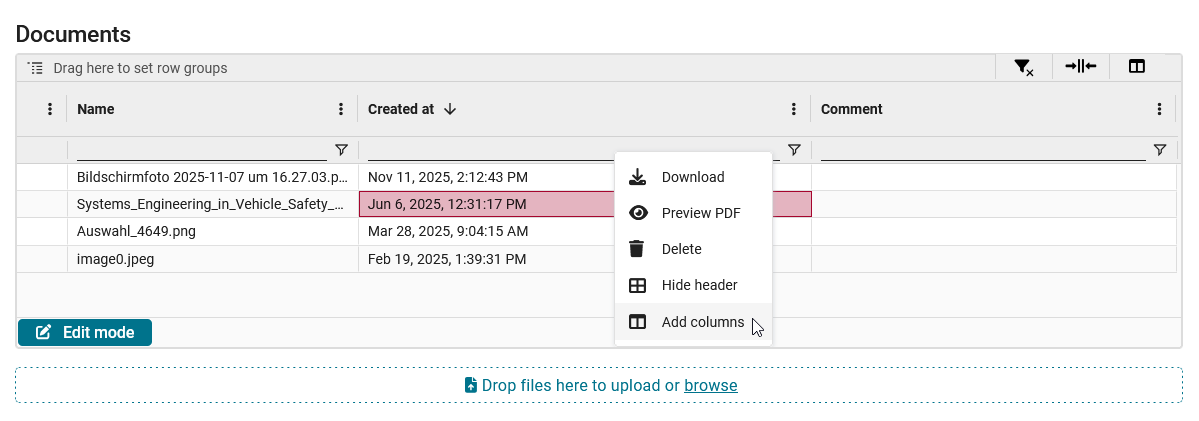
[#7016] This feature relates to the Documents area in Project. Users can now enter comments for their project documents. The basic workflow is as follows:
Comments can be used to give background information about a document. For example, users could mark outdated files with the comment “obsolete” or they could specify which dates regulation documents are valid from/to. | ||||||||||||||
| New feature PROJECT | Product variants are now displayed in the list of projects.
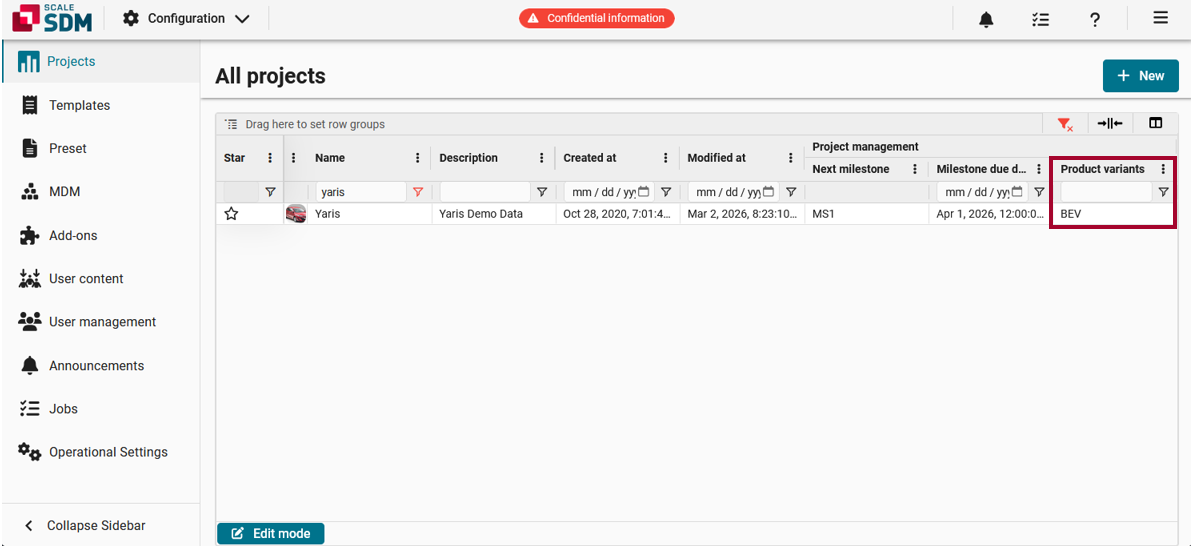
[#7655] This feature relates to the list of projects, which can be accessed by navigating to > Configuration > Projects. The overview now includes a column called Product variants. Here:
| ||||||||||||||
| New feature PROJECT | Project attributes are now displayed in the list of projects.
[#7650] This feature relates to the list of projects, which can be accessed by navigating to > Configuration > Projects. The overview now includes a column called Attributes. Here:
| ||||||||||||||
| New feature PROJECT | Projects can now be created, edited and deleted using the context menu options in the project grid.
[#6443] This feature relates to the list of projects, which can be accessed by navigating to > Configuration > Projects. Now when users right-click on a line in the grid, the context menu includes options to create, edit or delete a project.
| ||||||||||||||
| New feature RESULT | It is now possible to select (multiple) attachments when using icon view.
[#7259] This feature relates to the attachment panels in Result. For example, the tabs for Photos, Videos, Documents, Channels, etc. Specifically, this feature relates to situations when the attachments are displayed as preview images (icon view). While using icon view, users can now select one or multiple attachments (ctrl. + click) and then right-click to open a context menu with additional options. | ||||||||||||||
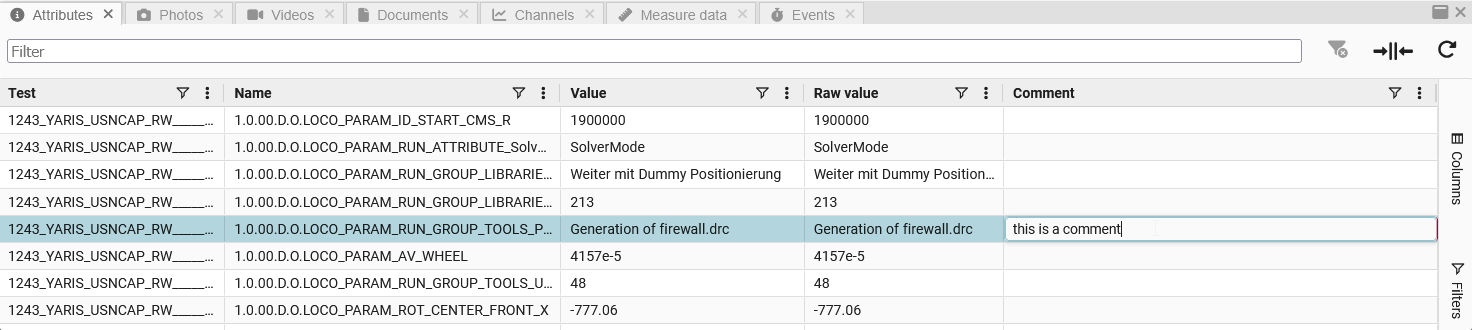
| New feature RESULT | The 'Attributes' tab now includes an editable 'Comment' column.
[#7154] This feature relates to the Attributes tab in Result. This tab now has an additional column called Comment. Here users can see the test attribute’s comment.
| ||||||||||||||
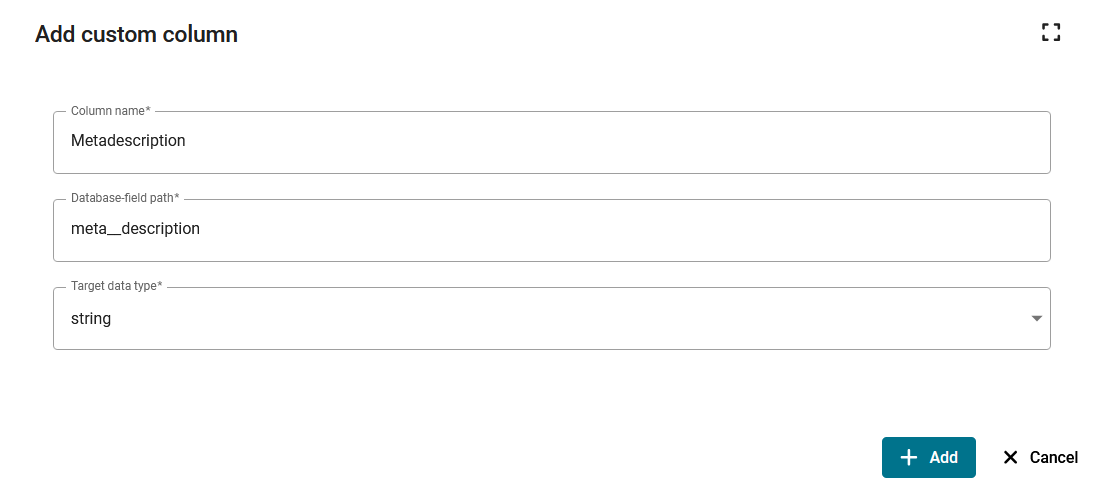
| New feature RESULT | Users can now display custom columns, which contain meta information about their attachments.
[#7593] This improvement relates to the attachment panels in Result, i.e. the tabs Photos, Videos, Documents, Channels, Measure data and Events. Specifically, it relates to situations when using list view. Users can now add custom columns to the grid, which are used for displaying meta information about the attachments. The basic workflow is as follows:
| ||||||||||||||
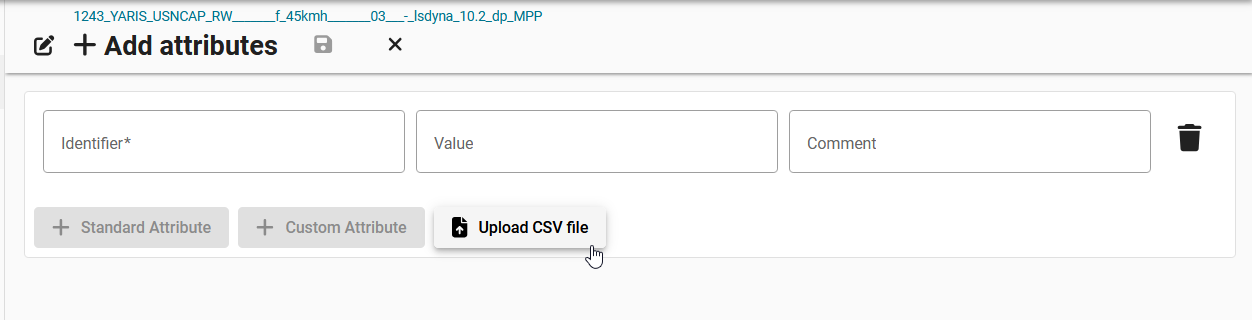
| New feature RESULT | Users can now enter attribute comments when uploading attributes with a CSV file.
[#7865] This feature relates to the Upload CSV file function, which allows users to upload attributes in a CSV file. Users can now enter comments for the attributes directly into their CSV file.
| ||||||||||||||
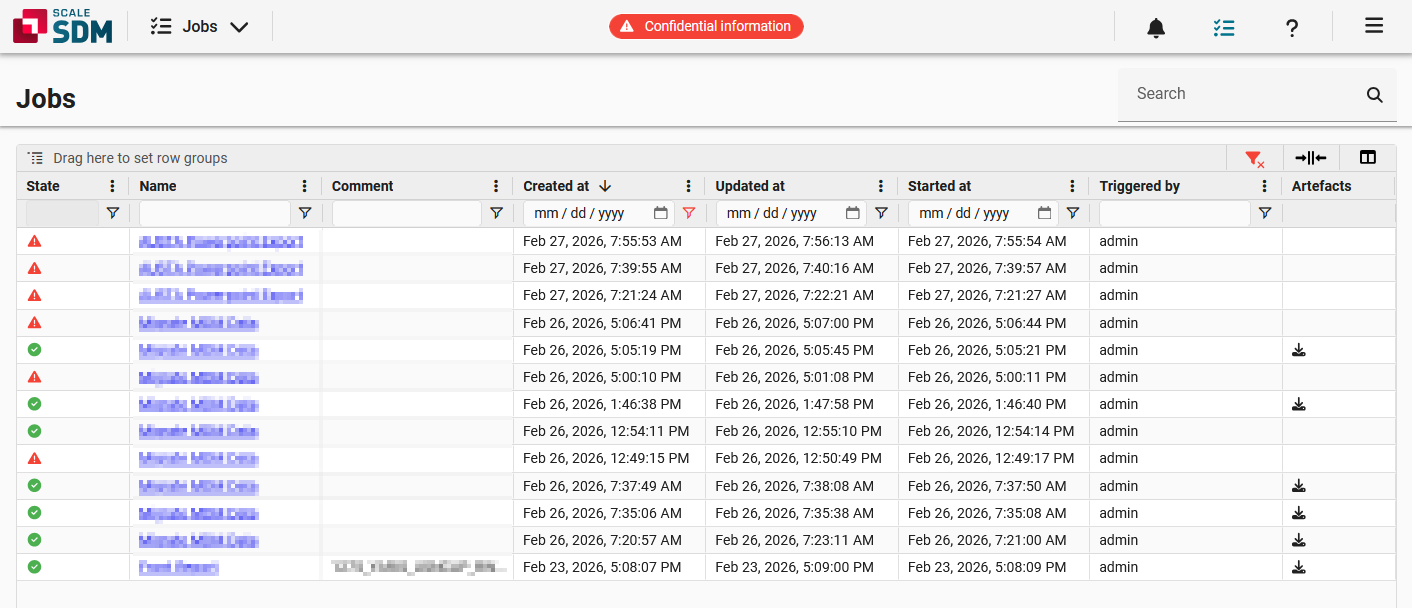
| New feature MISC | A 'Started at' column was added to the jobs area.
[#7936] This feature relates to the Jobs area, which can be accessed by clicking on in the upper right corner. The Jobs area now includes a Started at column, which displays the date and time when each job was started. This information is useful because some jobs remain pending for an extended period of time. That means, a lot of time might have elapsed between when a job was created and when it was first started.
| ||||||||||||||
| New feature MISC | A comment field was added to the MDM test case side panel.
[#7927] This feature relates to the MDM test cases, which can be accessed by navigating to > Configuration > MDM > Test cases. Specifically, it relates to the side panel, which can be expanded by clicking on in the upper right corner. The Details area of the side panel now includes a Comment field. Here, users see the comment that is saved for the MDM test case. 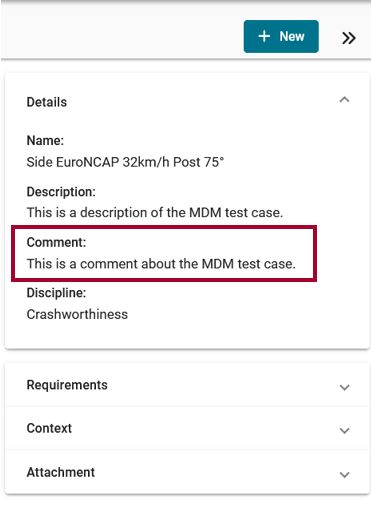 | ||||||||||||||
| New feature MISC | A uniqueness restriction was added to MDM attribute value lists.
[#6881] In the past, there was no uniqueness check when creating or editing a value list. If there were several different entries for the same system value with different display values, it was not clear which one was being used. Therefore, a uniqueness restriction was added, so that | ||||||||||||||
| New feature MISC | Disciplines can now be assigned to MDM attributes.
[#7527] This feature relates to the MDM attributes, which can be accessed by navigating to > Configuration > MDM > Attributes.
Use-case: Disciplines help users manage their MDM attributes more efficiently. Users can assign disciplines to MDM attributes and then group the attributes by discipline for faster navigation and filtering. | ||||||||||||||
| New feature MISC | It is now possible to edit the comments of multiple MDM test cases at once.
[#7786] This feature relates to the MDM test cases, which can be found by navigating to > Configuration > MDM > Test cases. Specifically, it relates to the new workflow for editing multiple MDM test cases. The pop-up window now includes a Comment area, where users can edit the comments of multiple MDM test cases at once. 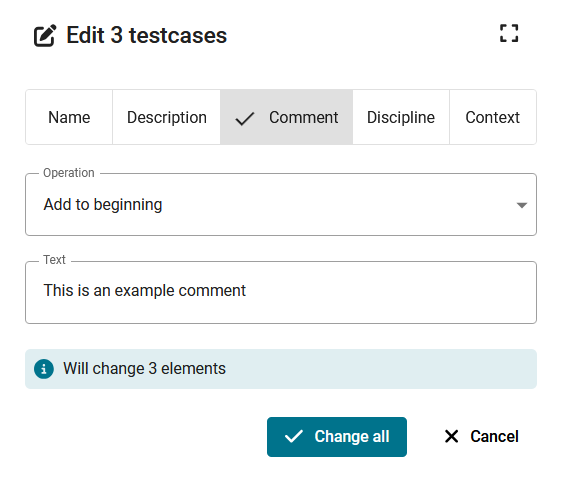 | ||||||||||||||
| New feature MISC | It is now possible to select 'Empty' or 'None' when adding context attributes with the 'Multi edit' function.
[#7785] This feature relates to the new workflow for editing multiple MDM test cases and for editing multiple MDM requirements. When adding context attributes, the pop-up window now includes the options Empty and None.
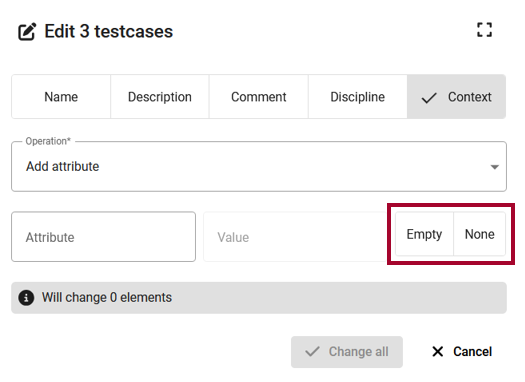 | ||||||||||||||
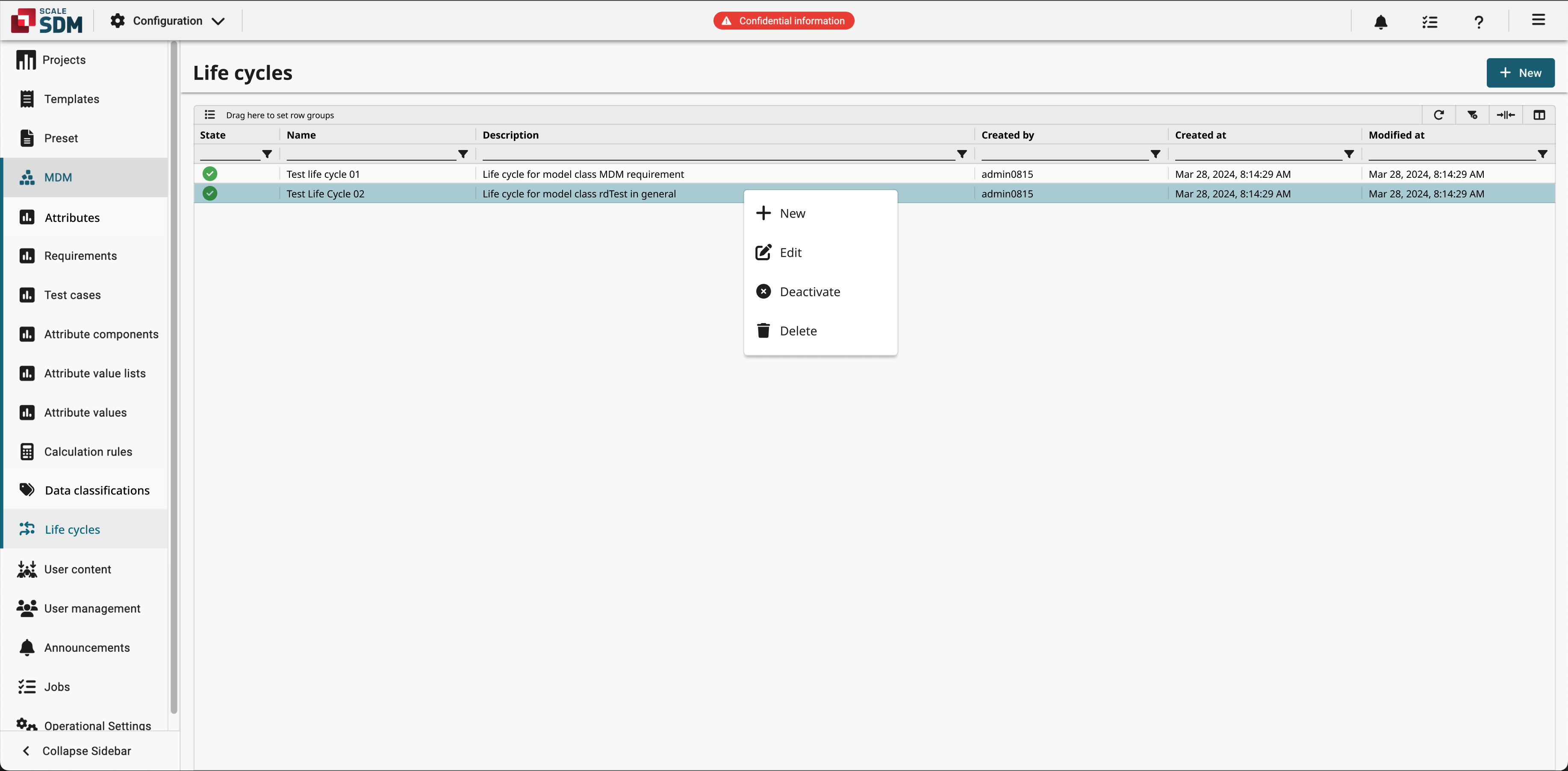
| New feature MISC | The configuration area now includes a menu where admins can manage life cycles.
[#7798] The life cycles area can be accessed by navigating to > Configuration > MDM > Life cycles. Here, admin users can manage life cycles and their states. That means, they can create, edit, activate/deactivate and delete life cycles. The life cycles in the list can be filtered, sorted and grouped as needed.
| ||||||||||||||
| New feature MISC | The permission 'canAccessStaffContent' was added to 'W3syseUserPolicyType' so that it can be used to restrict some pages. [#8012] | ||||||||||||||
| New feature MISC | The permissions for all project related models are now included inside the project policy and its schema. [#7894] | ||||||||||||||
| New feature MISC | There is a new option to configure caching of data between separate add-on executions via Add-On-Yaml
[#1762] The
| ||||||||||||||
| New feature MISC | Users can now reposition life cycle states via drag and drop.
[#8034] This feature relates to the life cycle states, which can be accessed by navigating to > Configuration > MDM > Life cycles and then creating a new life cycle or editing an existing one. The Life cycle states overview now includes a new column, which is pinned to the left and which has a drag handle. This allows users to drag and drop the life cycle states, thus repositioning them in the overview. | ||||||||||||||
| Improvement PROJECT | Long project titles are now truncated in the sidebar.
[#7217] This improvement relates to the vertical sidebar in
Project.
Specifically, it relates to projects that have lengthy titles. In the past, lengthy titles were not fully readable in the sidebar. This has been improved. Now lengthy titles are truncated. Users can view the entire project title in a tooltip. 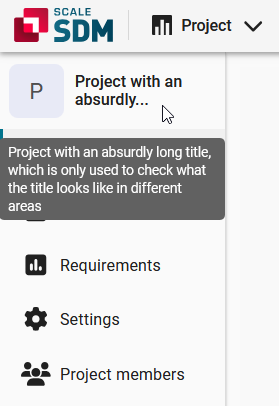 | ||||||||||||||
| Improvement PROJECT | Requirement value permissions are now required for status reports instead of requirement permissions.
[#8022] This improvement relates to the permissions that are necessary for deriving new status reports. Now users have more flexibility when configuring the permissions and dividing up responsibilities. For example, it is now possible to allow developers to derive new status reports, while at the same time preventing them from changing or adding project requirements. | ||||||||||||||
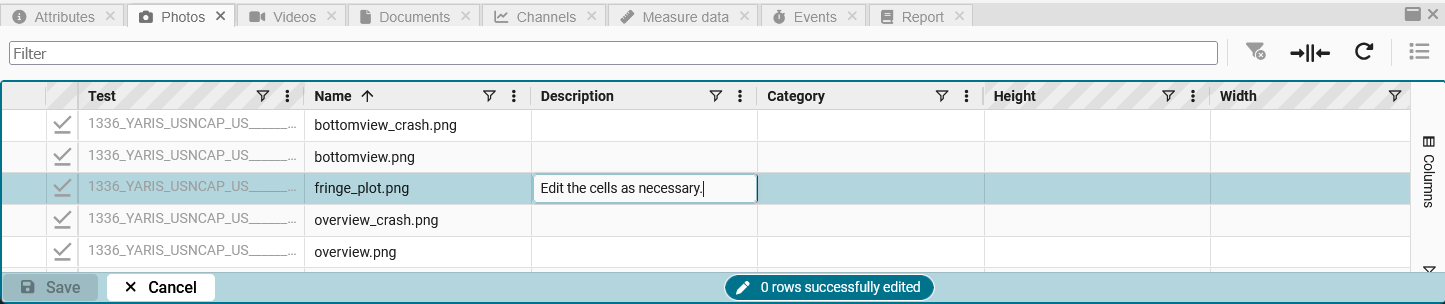
| Improvement RESULT | 'Edit mode' is now available in the attachment panels. This allows users to edit data more easily and it improves the user experience.
[#7264#7266] This improvement relates to the attachment panels in Result, i.e. the tabs Photos, Videos, Documents, Channels, Measure data and Events. Specifically, it relates to situations when using list view. Users can now activate “edit mode” and then edit the cells just like they would an Excel spreadsheet. The basic workflow is as follows:
| ||||||||||||||
| Improvement RESULT | Context menus were modified for consistency in the test result grid and attribute grid.
[#7629#7630] This improvement relates to the following areas: The context menus now follow the same design guidelines as other menus. That means, e.g. the context menus now use the same wording and icons as other menus. This improves the user experience and makes the application more intuitive. | ||||||||||||||
| Improvement RESULT | Display units are now shown with special characters and powers.
[#7590] This improvement relates to the column headers in the test grid of
Result.
Display units are now shown with special characters and powers. For example, the unit notation | ||||||||||||||
| Improvement RESULT | Improved error feedback when saving invalid presets.
[#7693] This improvement relates to the presets, which can be accessed by navigating to > Configuration > Preset > Presets. In the past, if a user tried to save an invalid preset, then a generic “Preset could not be updated” message was displayed without any further details. This has been improved. The system now provides specific information about what is wrong, helping users understand and correct issues before trying to save the preset again. | ||||||||||||||
| Improvement RESULT | It is no longer possible to delete a discipline if there is a related preset.
[#7480] This improvement relates to the disciplines, which can be accessed by navigating to > Configuration > User management > Disciplines. Users are no longer able to delete a discipline that is currently being used for a preset. | ||||||||||||||
| Improvement RESULT | It is now possible to remove all projects / collections at once.
[#4338] This improvement relates to the Projects and Collections windows in the
Result
test grid. Now when users right-click on a project / collection, a context menu appears. The context menu includes the option Remove all projects / Remove all collections. Users can select this option to remove all of the projects / collections at once. 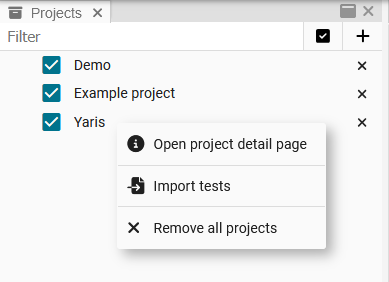 | ||||||||||||||
| Improvement RESULT | Users are no longer able to create collections in a foreign discipline.
[#7744] This improvement relates to the collections in the Result test grid. Specifically, it relates to the process of creating a new collection. In the past, the Discipline drop-down list displayed all available disciplines. That means, the user was able to create a collection in a foreign discipline. This has been improved. The Discipline drop-down list now only displays those disciplines that the user is assigned to. | ||||||||||||||
| Improvement RESULT | Values are now displayed immediately after being copied / pasted into attribute column cells.
[#8073] This improvement relates to the Result test grid. In the past, when values were copied / pasted into the cells of attribute columns, the values were not displayed until the user reloaded the grid. This has been improved. Pasted values are now immediately visible in the target cells. | ||||||||||||||
| Improvement RESULT | When selecting a report, users now see the version number of each report add-on.
[#7540] This improvement relates to the Report tab in
Result.
Now when users select a report from the drop-down list, they see the version number of each report add-on. The version number is displayed in parentheses. This helps users more easily differentiate between different versions. 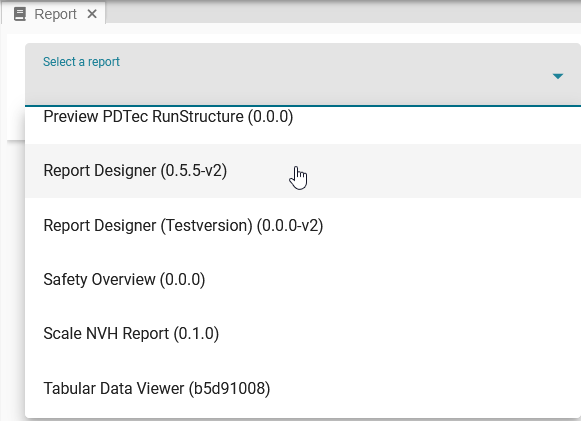 | ||||||||||||||
| Improvement MISC | Additional information is now logged about downloaded files.
[#7483] Logging was extended to ensure that all downloads (frontend, CLI, API) can be uniquely linked to a specific user ID. This allows users to analyze the triggered downloads as needed, e.g. for security or cost reasons. | ||||||||||||||
| Improvement MISC | Advanced filter options are now provided for rd test attributes. This was achieved by adding a filter model. [#7823] | ||||||||||||||
| Improvement MISC | Advanced filter options are now provided for rd tests. This was achieved by adding a filter model. [#7822] | ||||||||||||||
| Improvement MISC | Context menus were modified for consistency in areas where users upload files.
[#7633] This improvement relates to the context menus in the following areas:
The context menus now follow the same design guidelines. That means, e.g. the context menus now use the same wording and icons. This improves the user experience and makes the application more intuitive. | ||||||||||||||
| Improvement MISC | Model classes are now displayed with human-readable names.
[#7656] This improvement relates to the model classes, which can be accessed by navigating to > Configuration > MDM > Data classifications. The model classes were renamed as follows:
This helps users better understand each model class. | ||||||||||||||
| Improvement MISC | SSRM: Extraction columns tolerate data types that differ from the target type.
[#7965] Values that differ from the target type and that cannot be converted to it are ignored instead of being acknowledged with an error. | ||||||||||||||
| Improvement MISC | The 'Multi-edit' option is now disabled for external objects.
[#7563] This improvement relates to objects that have an internal/external distinction, e.g. MDM test cases and MDM requirements. Specifically, it relates to situations when users select multiple objects and right-click to access the context menu. The Multi-edit option is now disabled if an external object was selected. The option is disabled because external objects are read-only, meaning that they can not be edited, deleted, duplicated, or activated/deactivated. | ||||||||||||||
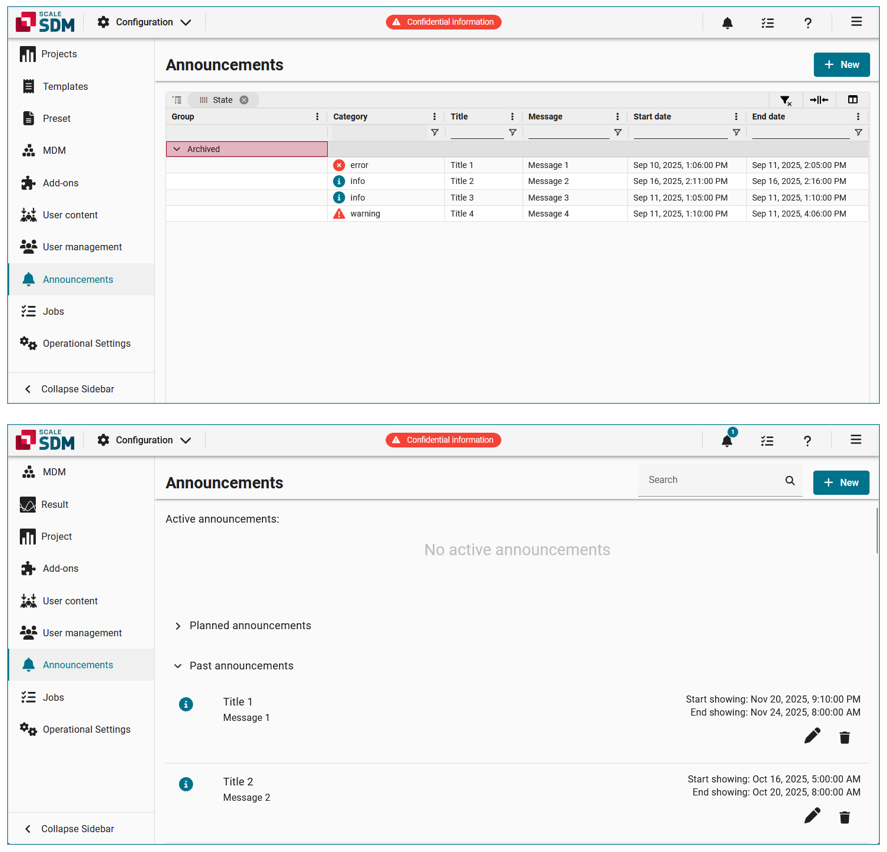
| Improvement MISC | The announcements page was redesigned.
[#7648] This improvement relates to the announcements page, which can be accessed by navigating to > Configuration > Announcements. The list of announcements has been redesigned. This is advantageous for two reasons:
| ||||||||||||||
| Improvement MISC | The entity search text is now correctly cleared after selecting the searched value. [#7477] | ||||||||||||||
| Improvement MISC | The workflow for duplicating objects was improved.
[#7678] This improvement relates to the workflow for duplicating objects, such as MDM attributes, requirements, test cases, product variants, templates, etc. In the past, when a user selected Duplicate from the context menu, a pop-up window opened where the user entered a name, then the user created the duplicate, and then the user was able to configure the remaining settings. This has been improved. The new workflow is as follows:
| ||||||||||||||
| Improvement MISC | The workflow was improved for selecting one single entry from a drop-down list.
[#7787] This improvement relates to situations when a user has already selected one single entry from a drop-down list, and now the user wants to change that selected entry. In the past, the drop-down list looked like it only contained the one selected entry. Users needed to first deselect this entry before they saw the full list. This behavior was improved for a better user experience. | ||||||||||||||
| Improvement MISC | unique_together was replaced with UniqueConstraint in model meta options. [#7488] | ||||||||||||||
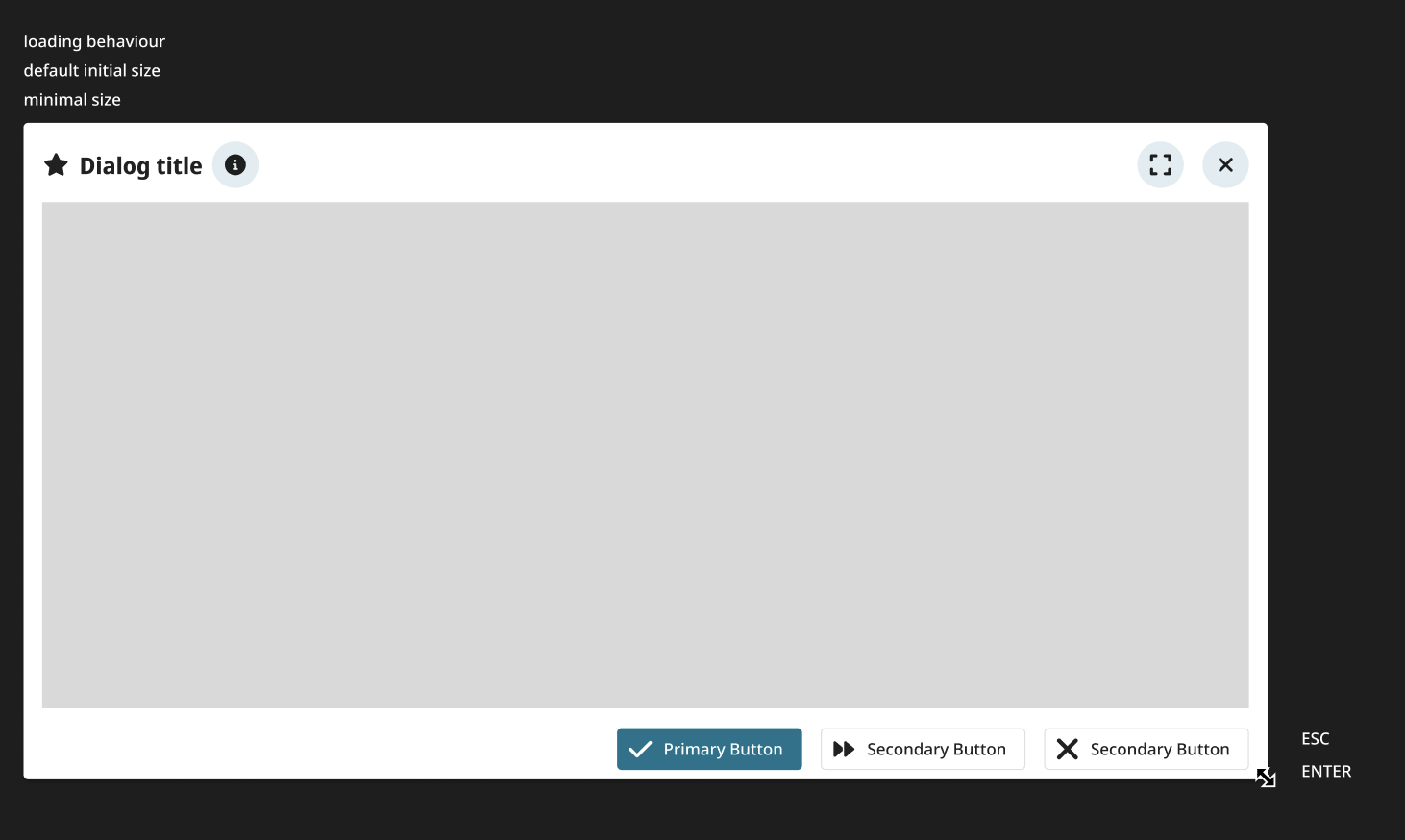
| Improvement MISC | Pop-up windows were modified for consistency throughout the application.
[#7705#7994] They now all follow the same design guidelines, use the same default window size, display elements in the same order, and allow users to resize the window with the cursor. These changes for consistency improve the user experience and make the application more intuitive.
| ||||||||||||||
| Improvement MISC | The following pop-up windows were modified for consistency in Project:
[#7705#7707#7708#7924]
| ||||||||||||||
| Improvement MISC | The following pop-up windows were modified for consistency in Result:
[#7705#7706#7713#7717#7924#7944#7952#7960#7981#7990]
| ||||||||||||||
| Improvement MISC | The following pop-up windows were modified for consistency in the 'Configuration' area:
[#7705#7709#7710#7924#7954#7961#7978#7979]
| ||||||||||||||
| Improvement MISC | The following pop-up windows were modified for consistency in other areas of the application:
[#7705#7712#7753#7924#7947#7980]
| ||||||||||||||
| Improvement API, BREAKING | The complexity threshold for GraphQL requests was reduced to 10.
[#7196] This impacts every GraphQL endpoint, and it will be a breaking change for requests which exceed the threshold. To reduce the complexity, some good practices are:
| ||||||||||||||
| Feature change API, BREAKING | Change logout to post request
[#7834] The general logout endpoint | ||||||||||||||
| Feature change PROJECT | The project test case is now automatically deleted if all of the project requirements have been deleted.
[#7227] In the past, the test case remained in the application, but it did not appear in the project requirements grid due to missing requirements. That means, there were project test cases, which were neither visible nor could be deleted. This has been changed to prevent empty project test cases. | ||||||||||||||
| Feature change RESULT | Users can now add custom attributes to a test in addition to MDM attributes.
[#7347] This change relates to the test details page in Result. Users can now manually add an attribute that does not have a matching MDM attribute. | ||||||||||||||
| Feature change API | REST API removed. This impacts third-party workers, add-ons and external scripts.
[#6898] The application provides GraphQL and REST API endpoints. The REST API endpoints are deprecated and are now being removed. Any third-party implementations should use the GraphQL endpoints at | ||||||||||||||
| Feature removal MISC | Plotly and related configurations were removed from the application. [#7878] | ||||||||||||||
| Bug fix PROJECT | Grid views and column definitions are now updated correctly.
[#6869#7871] This fix relates mainly to the requirements grid in Project. In the past, when a user changed the grid view (e.g. added or removed columns), the column definitions were not always updated correctly. That means, e.g. the user saw columns that shouldn’t have been available, or the user saw outdated column definitions. This issue was fixed by adding a migration functionality to the user content, which saves client content on the server and synchronizes it between clients and sessions. | ||||||||||||||
| Bug fix PROJECT | Grid views can now be renamed again.
[#7910] This fix relates to the views, which are available in several grids throughout the application e.g. in the project requirements grid, the MDM test case grid and the MDM requirements grid. In the past, users received an error message when renaming a view. This has been fixed. | ||||||||||||||
| Bug fix PROJECT | Project document attribute values no longer disappear.
[#7969] This fix relates to the Documents area in Project. Specifically, it relates to the attribute values, that can be added to documents. In the past, selected attribute values were only displayed for a short moment before they disappeared again. This behavior has been fixed. | ||||||||||||||
| Bug fix PROJECT | Rows can now be selected again in the 'Compare with MDM' window.
[#8009] This fix relates to the function for Comparing test cases and requirements with their MDM equivalents. In the past, the check boxes were not displayed in the row headings. This has been fixed. The check boxes are now available again. | ||||||||||||||
| Bug fix PROJECT | The 'Created by' field is no longer changed when updating a project document.
[#8057] This fix relates to the documents grid in Project. In the past, if a user changed or added project document attributes, then the Created by information was updated to show the user who made the changed. This has been fixed. The Created by information is set on initial import and it is no longer changed due to any further modifications of the project document. | ||||||||||||||
| Bug fix PROJECT | The date picker now works correctly when creating or editing a milestone.
[#8107] This fix relates to the process of creating or editing milestones in Project. In the past, users received an error when clicking on the calendar icon ( ). This has been fixed. The date picker now works correctly again. | ||||||||||||||
| Bug fix PROJECT | The global filter icon now works correctly in the project documents grid.
[#8094] This fix relates to the documents grid in Project. Specifically, it relates to global filter icon, which is displayed in the header. In the past, the global filter icon did not turn red when activated. It also did not clear the filters when clicked. These issues have been fixed. | ||||||||||||||
| Bug fix RESULT | Fixed an SSL error which occurred when saving a preset brick.
[#7908] When saving a preset brick which is used in multiple presets, the parallel validation of presets led to an error. The error was fixed by adjusting the validation so that it does not use any db connection. | ||||||||||||||
| Bug fix RESULT | Grouping by null values in grids with edit mode is working now. [#8102] | ||||||||||||||
| Bug fix RESULT | The 'Attributes' tab now correctly shows the display value in the 'Value' column.
[#7970] This fix relates to the Attributes tab in Result. In the past, the raw value was shown in the Value column. This has been fixed. The column now shows the display value. | ||||||||||||||
| Bug fix RESULT | The 'Show column definition' context menu item works again for grouped columns.
[#8029] This fix relates to the Show column definition context menu item in the Result test grid. In the past, the column definition was only displayed for non-grouped columns. This has been fixed. The definition can now displayed for grouped columns as well. | ||||||||||||||
| Bug fix RESULT | The column cache calculation no longer fails with an error when the column condition is optimized to True. [#7269] | ||||||||||||||
| Bug fix RESULT | The column filters are now working correctly in the 'Edit tests' window.
[#8064] This fix relates to the Edit tests window in Result. Specifically, it relates to the filters that are available for each column header. In the past, these filters were not working. This has been fixed. | ||||||||||||||
| Bug fix RESULT | The exif orientation tag is now taken into consideration when creating thumbnails for attachments. [#7844] | ||||||||||||||
| Bug fix RESULT | The menu items are now enabled and disabled based on file size in addition to updatable status. [#8103] | ||||||||||||||
| Bug fix MISC | An issue was addressed where an OIDC refresh-token operation could fail and an HTTP 500 error could be triggered. [#8023] | ||||||||||||||
| Bug fix MISC | Fix permitted params in user policy. [#8172] | ||||||||||||||
| Bug fix MISC | It is no longer possible to select non-association attributes in the context, e.g. of MDM test cases. Context sections now work as expected. Only association attributes can be used in contexts. [#7951] | ||||||||||||||
| Bug fix MISC | It is now possible to remove all roles from groups by updateGroup mutation. [#8074] | ||||||||||||||
| Bug fix MISC | The 'Show Header' context menu item is now only visible in grids where the header can actually be hidden/unhidden.
[#8026] In the past, this context menu item was visible in all grids throughout the application. This has been fixed. It is now only displayed in the relevant grids. | ||||||||||||||
| Bug fix MISC | The application header style was fixed in a few, specific customer systems.
[#8090] The application header font was temporarily changed from white to black, which made the texts difficult to read. This change only affected a few, specific customer systems. It has been fixed. | ||||||||||||||
| Bug fix MISC | The entity search function is now working correctly again.
[#7866] This fix relates to the function for editing multiple MDM requirements at once. Specifically, it relates to situations when the user searches for MDM attribute values in the Context tab. In the past, only some of the values in the list were searchable. This behavior has been fixed. | ||||||||||||||
| Bug fix MISC | The selection tree now works as expected on the page for editing users.
[#8071] This fix relates to the page for editing users, which can be accessed by navigating to > Configuration > User management > Users. In the past, the selection trees for assigning the user to groups and global roles did not display any values if no checkbox was checked and a flat hierarchy was displayed. This has been fixed. The selection trees are no longer empty under these conditions. | ||||||||||||||
| Bug fix MISC | Users now see feedback after uploading files.
[#7887] This fix relates to the process of uploading files, e.g. project documents or MDM test case side panel attachments. In the past, the user did not see any feedback after uploading attachments. New files were only visible after refreshing the browser. This has been fixed. | ||||||||||||||
| Bug fix MISC | When editing multiple MDM requirements or MDM test cases, numbers are now correctly converted to SI units.
[#7988] This fix relates to the process of editing multiple MDM requirements or MDM test cases at once. In the past, numeric attributes were not correctly converted to SI units, leading to inconsistent behavior compared to single-item editing. This has been fixed. Numeric values selected in the multi-edit dialog are now converted to the correct SI unit before saving. |


API changes
| Breaking | Type ProjectAttributeTypeConnection was removed |
| Breaking | Type ProjectAttributeTypeEdge was removed |
| Breaking | Type ProjectAttributeType was removed |
| Breaking | Type W3syseProjectAttributePolicyType was removed |
| Breaking | Type ProjectAttributeAttributesInputType was removed |
| Breaking | Type ProjectAttributeCreateMutationPayload was removed |
| Breaking | Type ProjectAttributeCreateMutationInput was removed |
| Breaking | Type ProjectAttributeUpdateMutationPayload was removed |
| Breaking | Type ProjectAttributeUpdateMutationInput was removed |
| Breaking | Type ProjectAttributeDeleteMutationPayload was removed |
| Breaking | Type ProjectAttributeDeleteMutationInput was removed |
| Breaking | Field updateProjectAttribute was removed from object type Mutation |
| Breaking | Field createProjectAttribute was removed from object type Mutation |
| Breaking | Field deleteProjectAttribute was removed from object type Mutation |
| Breaking | Field allProjectAttributes was removed from object type Query |
| Breaking | Field w3syseProjectAttributePolicy was removed from object type Query |
| Breaking | Field projectAttribute was removed from object type Query |
| Breaking | Field w3syseProjectAttributePolicies was removed from object type Query |
| Breaking | Field requirementvalueSet was removed from object type ProjectRequirementType |
| Breaking | Input Field attributesAttributes removed from input type ProjectUpdateMutationInput |
| Breaking | Input Field attributesAttributes removed from input type ProjectAttributesInputType |
| Breaking | Field contentTypeModel was removed from object type LoadModelDefaultDataClassificationType |
| Breaking | Input Field attributesAttributes removed from input type ProjectCreateMutationInput |
| Breaking | ProjectType.attributes type changed from ProjectAttributeTypeConnection! to JSONDict |
| Breaking | Removed argument last from ProjectType.attributes |
| Breaking | Removed argument offset from ProjectType.attributes |
| Breaking | Removed argument first from ProjectType.attributes |
| Breaking | Removed argument projectId from ProjectType.attributes |
| Breaking | Removed argument after from ProjectType.attributes |
| Breaking | Removed argument before from ProjectType.attributes |
| Breaking | Field url was removed from object type RdTestAttachmentType |
| Breaking | Enum value json was added to ExtractColumnTypeEnum enum |