
3.0.0
Release date: October 19, 2026
End of Life: October 19, 2028
Manual migration steps required
Support of minio through the helm chart is dropped. If minio from this helm chart was previously used, the data needs to be transferred to another storage before switching to this version. And the s3 storage configuration for envConfig.storage.s3 needs to be adjusted. Else stored data may be lost.
Summary of major changes
Add-ons: better visibility and elevated permissions
This release makes add-ons more powerful, visible, and reliable throughout the application.
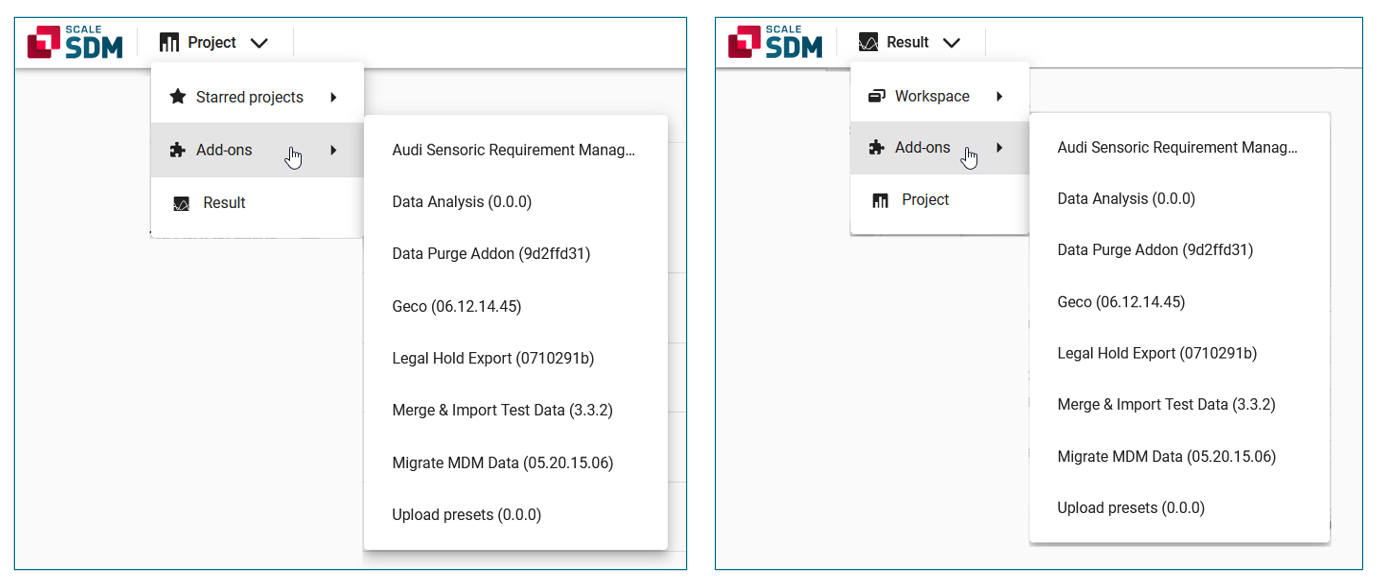
- The Add-ons menu entry is now available in the toolbar of both Project and Result.
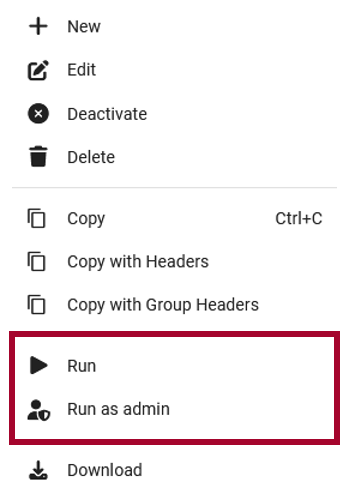
- The new Run as admin option makes it possible to start add-ons with privileged system user permissions.
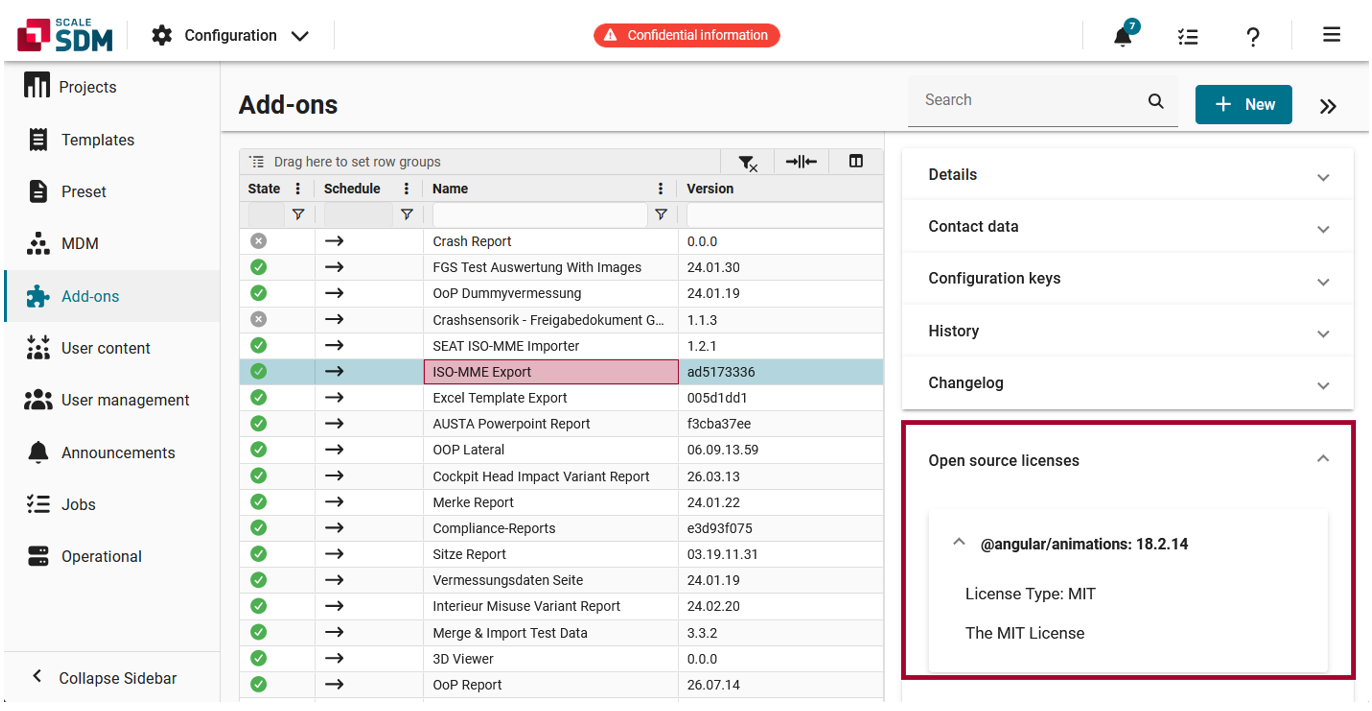
- License information for each add-on is now displayed in the side panel, giving users full transparency.
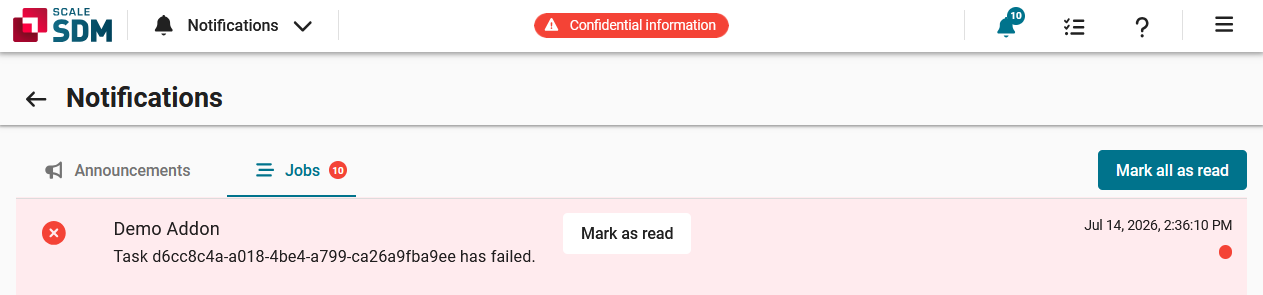
- Users are now automatically notified via job notifications when add-on runs finish.
Status reports: cleaner and more transparent
Status reports have been made smarter, safer, and easier to manage. This gives teams greater control over how they capture and communicate a project’s progress.
- To keep things tidy, super users can now delete Public status reports, making it easier to retire outdated reports.
- A new comment field lets users add context or a description to every status report.
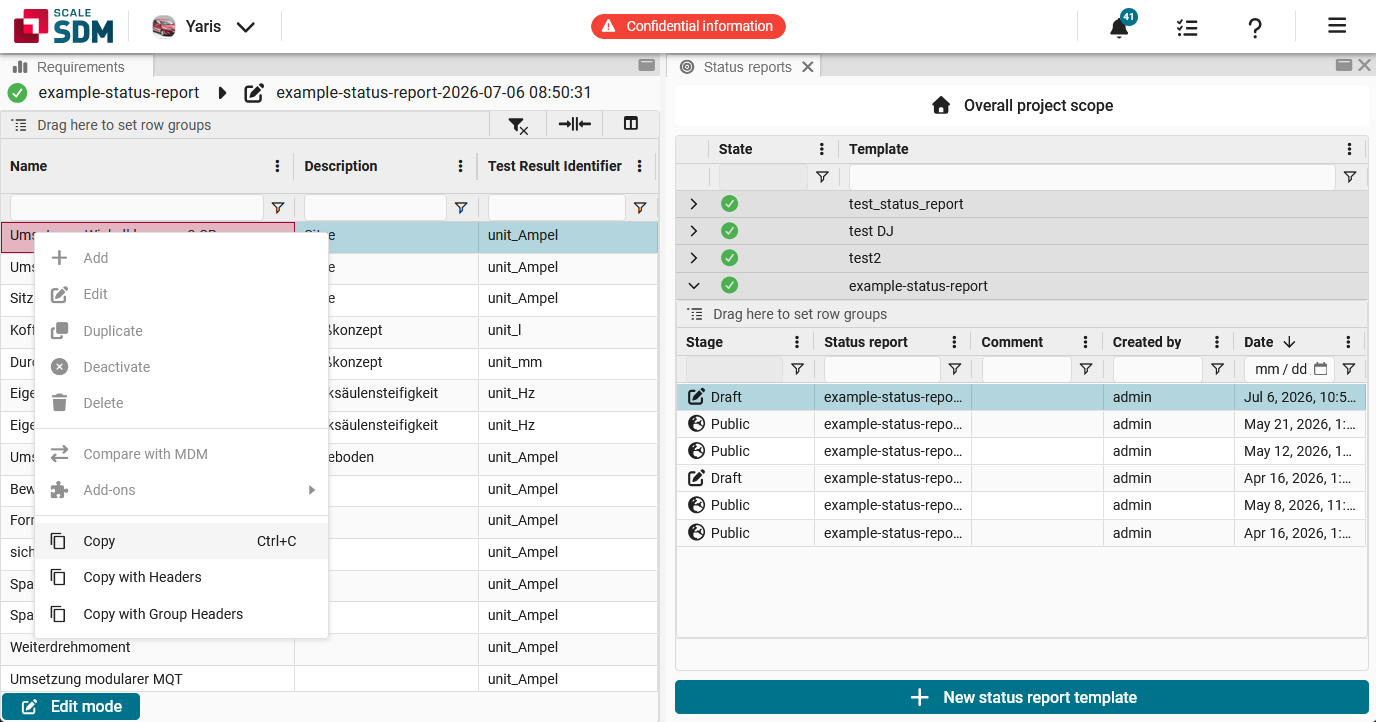
- Project requirements can no longer be edited while a status report is selected. This preserves the integrity of the status report, which is a snapshot of the project requirements at a specific time.
- The status summary and export summary now correctly reflect the requirements filtered by a status report.
Edit mode: faster and more reliable
Edit mode is now faster, smarter, and more dependable. These changes mean less friction, fewer surprises, and a smoother day-to-day editing experience.
- Saved changes now appear in the Result test grid immediately.
- Several long-standing frustrations have been resolved: typing to filter a drop-down no longer breaks edit mode, clearing an already-empty cell no longer throws an error, and pasting cells from Excel or LibreOffice no longer wipes out the row below.
- There is a new read-only capability, which can be used to disable editing for specific business contexts.
List of all changes
| New feature PROJECT | Public status reports can now be deleted.
[#7766] This feature relates to the status reports in
Project.
Previously, only Draft status reports could be deleted, causing the status reports area to accumulate obsolete Public reports. Super users can now delete Public status reports as well. 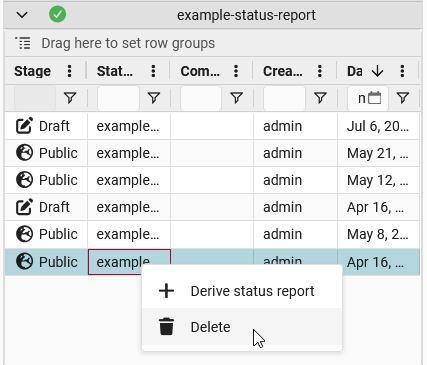 |
| New feature PROJECT | Users can no longer edit project requirements while a status report is selected.
[#8402#8400#8399] This feature relates to the status reports in Project. Because a status report is a snapshot of the project requirements at a specific time, users should not be able to modify the project requirements while a status report is selected. Changes should be made in the overall project scope and captured in newly derived reports. To make this possible, the context menu options for editing project requirements are now deactivated while a status report is selected. Note: These options were deactivated on the project requirement level, the test case level and the group level.
|
| New feature RESULT | The test attachment panel now displays add-ons with a test attachment interface. [#7876] |
| New feature RESULT | Values pasted into the test grid are now checked for validity.
[#8579#8614] This feature relates to edit mode in the Result test grid. Previously, when users pasted invalid values (e.g. from an Excel spreadsheet) into the test grid, they were not able to save their changes, but they also did not receive an error message indicating what went wrong. Now when users paste values into the test grid, the content is directly validated and any errors are highlighted. This gives users immediate feedback before they click on the save button. |
| New feature MISC | Add-on license information is now visible in the side panel.
[#7776] This feature relates to the add-ons side panel, which can be accessed by navigating to > Configuration > Add-ons, selecting an add-on in the grid and clicking on . The side panel now contains an Open source licenses area, which displays e.g. the license type and copyright information of any open source licenses that are applicable to the add-on.
|
| New feature MISC | An optional authentication for the cache backend was added. [#7857] |
| New feature MISC | Grid edit mode now supports a read-only setting.
[#7603] Edit mode now supports a read-only setting to disable editing (and hide the edit mode UI). This is useful if a business context does not allow changes, e.g. public status report or missing permissions. If |
| New feature MISC | It is now possible to run add-ons with privileged system user permissions via the context menu.
[#8391#8248] This feature relates to the add-ons, which can be accessed by navigating to > Configuration > Add-ons. Specifically, it relates to schedulable add-ons, which are displayed with a icon in the Schedule column and a icon in the far right column. When a user right-clicks on such an add-on, the context menu now includes options to manually trigger the add-on.
 |
| New feature MISC | Job notifications are now used to notify users about finished add-on runs.
[#8370] This feature relates to the notifications, which can be accessed by clicking on the notifications icon ( ) in the toolbar. A job notification is now created when an add-on run finishes. The notification state corresponds to the end state of the add-on run i.e. failed states to error, success states to success.
|
| New feature MISC | Long-running requests can now be executed asynchronously.
[#4086] Some workflows exceed the 60 second single-request limit, e.g. complex calculations (like matching context conditions), export generation, archive collection, and importing test cases or requirements into projects. To provide timely user feedback, these operations are now run asynchronously outside the normal request-response cycle. |
| New feature MISC | The 'Add-ons' menu entry is now visible throughout the entire application.
[#8446] Users can now access the Add-ons menu entry from the toolbar of both Project and Result. In the past, the Add-ons entry was only visible within Result.
|
| New feature MISC | There is a new GraphQL object, which only exposes basic/public user information.
[#8198] Previously, the GraphQL object |
| New feature DEPLOYMENT | Color for logs can be enabled via helm values. [#8801] |
| New feature API | It is now possible to evaluate the policies of arbitrary users.
[#8326] Evaluating the policies of other users can be done by passing the user ID of the target user in the policy query: If the requesting user does not have the |
| New feature API | Users can now set/change the life cycle state when creating or updating a test.
[#8372] This allows e.g. tests that are synchronized from external systems to be imported or updated with their correct life cycle state. Furthermore, non-neighboring state transitions are now supported. Internally, a state-by-state step-wise transition is used. |
| Improvement PROJECT | A comment field was added to the status report panel.
[#8495] Previously, only the creator and creation time were saved as meta information when creating a new status report. This has been improved. A comment field was added to the status report panel, which allows users to add a text or description to their status report. 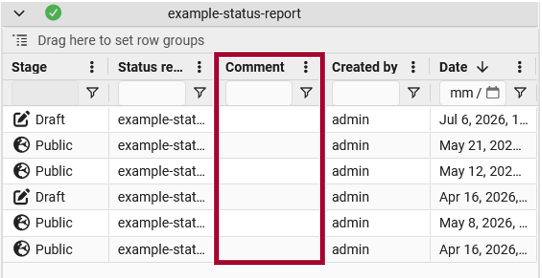 |
| Improvement RESULT | Changes are now displayed more quickly in the test grid when using edit mode.
[#8378] This improvement relates to edit mode in the Result test grid. Previously, when a user saved their changes, the values were saved as test attributes but the grid did not immediately reflect the changes. This gave users the impression that the save had failed. Change processing times have been improved so that the values now appear immediately. |
| Improvement RESULT | Test grid errors now produce consistent user notifications.
[#8462] This improvement relates to the test grid in Result. Users now receive consistent feedback for any actions that fail due to insufficient permissions or errors. This helps improve transparency and reduce confusion. |
| Improvement RESULT | The performance of the test grid was improved.
[#7999] Rendering and interaction performance in the Result test grid was improved, particularly for grids with many rows or columns. |
| Improvement RESULT | The test grid no longer reloads when a test is added or removed from a collection.
[#5143] This improvement relates to the test grid in Result. In the past, the test grid reloaded when a user added a test to a collection or removed a test from a collection. This caused unnecessary waiting time and it caused the user to lose the current scroll bar position. This has been changed to improve the user experience. |
| Improvement MISC | 'allMdmAttributes' queries are now faster thanks to the new 'entries_list' field.
[#8227] The new |
| Improvement MISC | A routine update of Python packages was performed.
[#7652#8244] Python package dependencies are routinely updated. This keeps the application current with security patches, bug fixes, performance improvements, and new features from the open-source ecosystem. |
| Improvement MISC | Cache error messages on local dict instead of external cache to improve performance. [#8747] |
| Improvement MISC | Calculation rule execution now avoids N+1 queries. [#8488] |
| Improvement MISC | Deriving project test cases is now faster thanks to prefetching.
] Related fields are now prefetched while deriving project test cases. This improves the performance. |
| Improvement MISC | Discipline restrictions are now taken into consideration for presets and MDM attributes.
[#8219] This improvement relates to the MDM attributes, which can be accessed by navigating to > Configuration > MDM > Attributes and to the presets, which can be accessed by navigating to > Configuration > Preset > Presets. When creating MDM attributes or presets, users can select a discipline, which is essentially a filter (users only see data that matches their own disciplines). Previously, users were able to see MDM attributes and presets belonging to other disciplines. This is now enforced consistently. Note: Super users continue to see objects for all disciplines. |
| Improvement MISC | Error messages now identify the missing permission.
[#8234#8465] Previously, when an action failed due to insufficient permissions, users only saw a generic ‘You do not have permission to perform this action’ message. Error messages now state exactly which permission is missing. |
| Improvement MISC | GraphQL subscriptions now use the graphql-ws library (graphql-transport-ws protocol). [#5045] |
| Improvement MISC | New add-on versions are now disabled while they are still being generated.
[#6936] This improvement relates to the add-ons, which can be started by right-clicking on a line in the Result test grid and selecting Add-ons from the context menu. Previously, when uploading a new version of an add-on, it appeared in the context menu immediately after reloading the test grid. However, the new version could not necessarily be started right away and trying to load it caused an error. This behavior has been improved. New versions are now disabled while still being generated. |
| Improvement MISC | Tests for the subscription activation confirmation were reactivated. [#4738] |
| Improvement MISC | The documentation for developing add-ons was updated.
[#8439] The add-on developer documentation was reviewed and updated to reflect the current workflow. |
| Improvement MISC | The MDM attributes grid now displays the same information as the corresponding edit page.
[#8365] This improvement relates to the MDM attributes grid, which can be accessed by navigating to > Configuration > MDM > Attributes. In the past, there were differences between the columns displayed in MDM attributes grid and the input fields displayed when adding or editing an MDM attribute. The following changes were made to ensure consistency:
|
| Improvement MISC | The phex websocket proxy config was adjusted after the latest aiohttp security update to prevent connection issues. [#8778] |
| Improvement MISC | The user documentation for required Key Value store was added. [#8690] |
| Improvement MISC | The visual spacing was improved for dialogs.
[#8453] This improvement relates to dialogs, such as the Data analysis add-on. In the past, there was empty space between the header and the add-on. This visual spacing was reduced to improve the user experience. |
| Improvement MISC | Tracking and evaluating instance changes is now more efficient.
[#8489] Unnecessary field loading and per-instance database queries were removed from the change-tracking pipeline, which reduces the database load. |
| Improvement MISC | Uploading multiple attachments is now significantly faster.
[#8469] Previously, uploading multiple attachment files was very slow. To improve performance, a copy of the uploaded files is now delegated to a background job. |
| Improvement DEPLOYMENT | There is now a retry mechanism for handling ErrImagePull/ImagePullBackOff during add-on execution setup. [#8301] |
| Improvement DEPLOYMENT | There are now sensible Redis socket timeout limits.
] Redis socket timeouts are now explicitly configured across the server, worker and operator-worker:
|
| Feature change DEPLOYMENT | Changing the Log Level for non-relevant logs [#8799] |
| Feature change DEPLOYMENT | Switch non relevant logs for file derivative generation to DEBUG [#8800] |
| Feature change MISC | Kubernetes versions below 1.30 are no longer supported.
[#8281] The Helm chart previously supported Kubernetes 1.24 and higher. This has been changed. The minimum supported version is now 1.30. |
| Feature change DEPLOYMENT | The PostgreSQL client was updated to version 17. ] |
| Feature removal DEPLOYMENT, BREAKING | Minio was removed from the Helm Chart.
[#8725] The helm chart no longer includes the bitnami minio chart as a sub-chart. It was removed as the application now requires externally defined s3 solutions. |
| Feature removal DEPLOYMENT, BREAKING | The default runner image (worker-customtools-python) was removed.
[#6311] The |
| Feature removal DEPLOYMENT, BREAKING | The Redis subchart was removed from the Helm chart.
[#8463] The Redis subchart is no longer provided via the |
| Feature removal API | The deprecated field 'displayValue' was removed from 'RdTestAttributeType'. [#6351] |
| Feature removal API | The field 'users' was removed from ClientStateType. Use 'clientStateUsers' instead. [#8406] |
| Bug fix PROJECT | Interval thresholds are now correctly displayed in the project requirements grid.
[#8850] This fix relates to the Threshold column within the requirements grid in
Project.
Previously, interval thresholds were displayed incorrectly if the corresponding MDM attribute did not have a display unit. For example, the threshold |
| Bug fix PROJECT | Project requirements can now be grouped by the 'Assessment' column.
[#8482] This fix relates to the requirements grid in Project. Previously, grouping the requirements grid by the Assessment column produced an error. This has been fixed. |
| Bug fix PROJECT | Selected MDM test cases are now correctly added to a project.
[#8613] This fix relates to the process of adding MDM test cases to a project via the Add MDM test cases to project dialog. Previously, the procedure could silently fail because pagination returned duplicate IDs. This has been fixed. |
| Bug fix PROJECT | The export summary now displays the correct requirements when filtering by a status report.
[#8260] This fix relates to the export summary function in Project. In the past, when filtering the project requirements by a status report, the export summary displayed the requirements from the overall scope, rather than from the status report. This has been fixed. |
| Bug fix PROJECT | The status summary now displays the correct information when filtering by a status report.
[#8454] This fix relates to the status summary in Project. Previously, the status summary was empty after selecting a status report. This has been fixed. The status summary now displays the correct information, regardless of whether the requirements are filtered by a status report. |
| Bug fix PROJECT | Users now receive status updates after adding project requirements.
[#8618] This fix relates to the process of adding MDM test cases to a project. Previously, when adding test cases, the user only saw a pop-up window displaying processing feedback for a very short time. Then the window closed and the user did not have any further feedback about the status of the ongoing process. This has been fixed. The pop-up window now remains open while the test cases are being added to the project. This gives the user feedback that the process is still ongoing. |
| Bug fix PROJECT | Users now see an error if they try to save a project without a name.
[#8377] This fix relates to the list of projects, which can be accessed by navigating to > Configuration > Projects. Since the project name is a mandatory field, users now see an error message if the Name cell is empty. The save button is also disabled until a name has been entered. |
| Bug fix RESULT | After clicking on 'Reset to default', the image displayed in the carousel now matches the thumbnail image.
[#8751] This fix relates to the Photos tab in Result. When a user double-clicks on a thumbnail image, a larger version of this image is displayed in a carousel. Previously, if a user clicked on Reset to default ( ) in the upper right corner of the Photos tab, and then clicked on a thumbnail image, then the wrong image was displayed in the carousel. This has been fixed. The image in the carousel now matches the thumbnail image. |
| Bug fix RESULT | Clearing an already empty cell in the test grid no longer results in an error.
[#8549] This fix relates to edit mode in the
Result
test grid. Previously, using |
| Bug fix RESULT | Columns whose names include conditional line breaks are now included in the column search results.
[#7775] This fix relates to the column headers in the
Result
test grid. Specifically, it relates to those columns that are defined with a preset and whose header name includes a conditional line break ( |
| Bug fix RESULT | Non-numeric channel header values (e.g. NOVALUE) are now treated as 0 when plotting.
[#8550] Previously, channels whose header contained a non-numeric value such as |
| Bug fix RESULT | Pasting multiple cells that end with a line feed no longer clears the next row.
[#8537] This fix relates to edit mode in the Result test grid. Previously, if a user copied cells from a spreadsheet (e.g. Excel or LibreOffice) whose selection ended with a line feed, then pasting those cells into the test grid also cleared the cell in the following row. This has been fixed. Trailing line feeds are now stripped before pasting. |
| Bug fix RESULT | Remove test is no longer locking the whole column cache table.
[#8697] A lock timeout was also added for future usages of the method so that it can never block indefinitely. |
| Bug fix RESULT | The 'Failed to load life cycles' message is now only displayed if relevant.
[#8706] Previously, users without any life cycle related permissions saw the error message “Failed to load life cycles”. This was disruptive for users who had not activated the life cycles feature, because it meant that they needed to set permissions for a feature that they did not use. This behavior has been fixed. The error message is now only displayed to users who work with the life cycles feature and do not have the necessary permissions. |
| Bug fix RESULT | The user interface no longer refreshes without a recognizable reason.
[#8743] Previously, the user interface of Result would refresh at regular intervals, e.g. every 20 minutes, without any recognizable reason. This led to the loss of current settings and it interrupted the user’s workflow. This behavior has been fixed. The user interface no longer reloads unexpectedly. If a reload is technically necessary, the current settings and the work in progress are now preserved. |
| Bug fix RESULT | Typing to filter a drop-down list no longer breaks edit mode.
[#8534] This fix relates to edit mode in the Result test grid. Previously, activating edit mode, double-clicking a cell to open a drop-down list, and then typing to filter the options caused an error that disabled further editing and required a full page reload. This has been fixed. |
| Bug fix RESULT | Units are now displayed in the test grid column headers.
[#8898] This fix relates to the test grid in Result. Previously, display units such as km/h were not displayed in the column headers of the test grid, even though the display units were saved for the corresponding attributes. This has been fixed. |
| Bug fix MISC | A rare error when downloading files no longer occurs.
[#8490] An internal KeyError that could interrupt file downloads under specific conditions is now handled gracefully. |
| Bug fix MISC | Add-ons without a play button can no longer be triggered manually.
[#8476] This fix relates to the add-ons, which can be accessed by navigating to > Configuration > Add-ons. Here, add-ons that can be triggered manually are displayed with a play button. Previously, all add-ons could be run manually by clicking on the empty cell where the play button would otherwise appear. This has been fixed. |
| Bug fix MISC | Editing a project role no longer causes the corresponding life cycle state configuration to be emptied.
[#8457] This fix relates to the project roles, which can be accessed by navigating to > Configuration > User management > Project roles. It also relates to the life cycle states, which can be accessed by navigating to > Configuration > MDM > Life cycles and looking at the Life cycle states area within a life cycle. Previously, if a life cycle state was configured with permissions for a specific project role, then any edit to that role (even an unrelated one) emptied the life cycle state configuration. This has been fixed. Edits on the project role page no longer affect the life cycle state configuration. |
| Bug fix MISC | It is now possible to remove a component from an MDM attribute.
[#8914] This fix relates to the MDM attributes, which can be accessed by navigating to > Configuration > MDM > Attributes. Previously, when editing an attribute that was assigned to a component, there was no way to deselect the component. That means, users were not able to remove the component from the MDM attribute. This has been fixed. Users can now click on an icon to remove the component. |
| Bug fix MISC | Logging in with a user that lacks permissions no longer causes an infinite loop. [#8050] |
| Bug fix MISC | Logout and error handling null check was added. [#8504] |
| Bug fix MISC | Non-superusers can now view and add access tokens.
[#8559] This fix relates to the profile page, which can be accessed by navigating to > My profile. Previously, the Access tokens area was only visible to superusers. This has been fixed. Now all users who have the relevant permissions ( |
| Bug fix MISC | Null values and empty strings can no longer be mixed in string-based columns.
[#8424] Mixing null values and empty strings in string-based columns can cause issues, e.g. when grouping by such a column. A migration was added to prevent such issues. |
| Bug fix MISC | Permission issues on client state tags were fixed.
[#6971] Previously, client state tags could be deleted or modified in ways that bypassed intended permissions. This has been fixed so that CRUD operations on discipline tags are now properly restricted. |
| Bug fix MISC | Server memory leaks were investigated and resolved. [#8332] |
| Bug fix MISC | The application health now recovers after the database restarts. [#8762] |
| Bug fix MISC | The MDM test case edit page no longer accepts invalid context conditions.
[#8560] This fix relates to the MDM test cases, which can be accessed by navigating to > Configuration > MDM > Test cases. Previously, users could save a test case even if a context field was invalid. For example, users could add a context attribute without assigning a mandatory Value. Saving is now blocked when any context condition is invalid. |
| Bug fix MISC | The number of DB connections from worker pods was reduced.
[#8750] Previously, there was a high number of open connections to the DB, which blocked interactions. This has been fixed. The number of DB connections is now kept as low as needed. |
| Bug fix MISC | There are no longer constant errors while connecting cache from the operator worker. [#8663] |
| Bug fix MISC | User notifications can now be marked as read.
[#8369] This fix relates to the user notifications, which can be accessed by clicking on the notifications icon ( ) in the toolbar. In the past, users were not able to mark notifications as read, since the permission check always failed. This has been fixed. Users are now able to mark their notifications as read. |
| Bug fix MISC | When an MDM requirement is copied, its context is now correctly copied as well.
[#8437] This fix relates to the MDM requirements, which can be accessed by navigating to > Configuration > MDM > Requirements. In the past, when a user right-clicked on a requirement and selected Duplicate from the context menu, a copy of the requirement was created but its context was left empty. This has been fixed. The context of the requirement is now correctly copied as well. |
| Security fix DEPLOYMENT | Security updates of application images and packages. ] |
| Security fix | The following vulnerabilities were fixed:
[#8931]
|
API changes
| Breaking | Type ProjectTestCaseDeriveMutation was removed |
| Breaking | Input Field projectId: UUID! was added to input type ProjectTestCaseDeriveMutationInput |
| Breaking | Input Field mdmTestCaseSelections: [ProjectTestCaseDeriveSelectionInput]! was added to input type ProjectTestCaseDeriveMutationInput |
| Breaking | Input Field project removed from input type ProjectTestCaseDeriveMutationInput |
| Breaking | Input Field filterModel removed from input type ProjectTestCaseDeriveMutationInput |
| Breaking | Input Field quickFilter removed from input type ProjectTestCaseDeriveMutationInput |
| Breaking | Input Field selectionStateChanges removed from input type ProjectTestCaseDeriveMutationInput |
| Breaking | Input Field productVariant removed from input type ProjectTestCaseDeriveMutationInput |
| Breaking | Input Field rowGroupCols removed from input type ProjectTestCaseDeriveMutationInput |
| Breaking | Default value for input field ProjectTestCaseDeriveMutationInput.mergeContextCondition changed from True to Undefined |
| Breaking | LifecycleType.createdBy type changed from UserType to PublicUserType |
| Breaking | AuditLogType.createdBy type changed from UserType to PublicUserType |
| Breaking | MdmTestCaseType.lastModifiedBy type changed from UserType to PublicUserType |
| Breaking | StatusReportTemplateType.lastModifiedBy type changed from UserType to PublicUserType |
| Breaking | Mutation.deriveProjectTestCase type changed from ProjectTestCaseDeriveMutation to AsyncRequestPayload |
| Breaking | Type for argument input on field Mutation.deriveProjectTestCase changed from ProjectTestCaseDeriveMutationInput to ProjectTestCaseDeriveMutationInput! |
| Breaking | Field users was removed from object type ClientStateType |
| Breaking | ClientStateType.createdBy type changed from UserType to PublicUserType |
| Breaking | ProjectRequirementType.modifiedBy type changed from UserType to PublicUserType |
| Breaking | Field displayValue was removed from object type RdTestAttributeType |
| Breaking | ProjectTestCaseType.lastModifiedBy type changed from UserType to PublicUserType |
| Breaking | StatusReportType.createdBy type changed from UserType to PublicUserType |
| Breaking | Removed argument asOf from RequirementValueType.historicalRecords |
| Breaking | Field userPermissions was removed from object type UserType |
| Breaking | RdTestTemplateType.createdBy type changed from UserType to PublicUserType |
| Breaking | MdmRequirementType.lastModifiedBy type changed from UserType to PublicUserType |